A product manager is refining the PRD for next quarter's key feature. An engineering lead is documenting a major codebase rewrite. A designer in another time zone is drafting new guidelines for foldable screens. All three need input from each other, and much of that input happens at different times of day.
For remote and async teams, the hardest part of collaboration usually isn't the work itself. It's keeping context in one place. The document lives in one app, the discussion about it lives in another, and the record of what changed and why, is often not kept at all or lost with time.
In its recent releases, AppFlowy has shipped four features that address this directly:
- Real-time collaborative editing
- Inline comments
- Version history
- User mentions
This blog post explains how each feature works and shares practical ways your team can use them.
AppFlowy collaboration features at a glance
| Feature | What it does | Where it works | Best for |
|---|---|---|---|
| Real-time collaborative editing | Lets multiple users edit the same page at the same time | Documents, boards, and databases | Live reviews, shared planning, testing sessions |
| Inline comments | Adds threaded comments to specific blocks | Documents and database row pages | Feedback, discussions, decision records |
| Version history | Automatically saves page states you can preview and restore | Documents | Safe revisions, tracking changes |
| User mentions | Notifies members or guests by email and push notification | Documents, boards, databases, and inline comments | Handoffs, questions, requesting approval |
1. Real-time collaborative editing
What is real-time collaborative editing in AppFlowy?
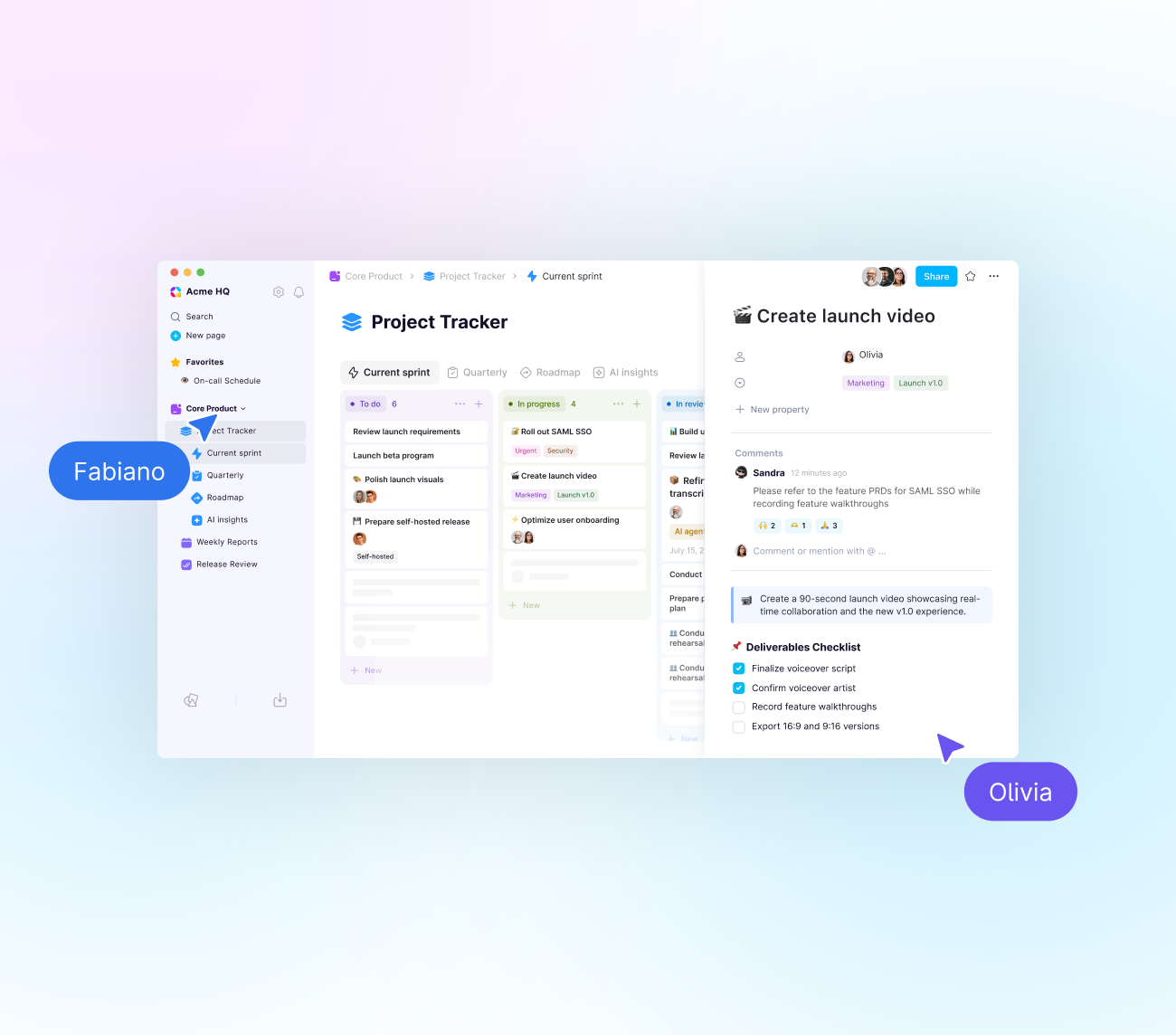
Real-time collaborative editing in AppFlowy lets multiple people view and edit the same page at the same time, with changes syncing to everyone instantly, without the need to manually refresh the page. Two visual cues show who else is on the page. Each collaborator has a personalized cursor that moves as they work, and profile avatars of all active users appear in the top-right corner of the window.
How does it work?
AppFlowy's real-time editing is built on CRDTs (conflict-free replicated data types), using Yrs, the Rust implementation of the Yjs framework. Your edits are first cached in your local AppFlowy app, so they take effect right away on your screen. AppFlowy then resolves the global state of the page almost instantly and syncs everyone's changes together. In practice, this means several people can type on the same page at once without overwriting each other's work.
How teams use real-time collaborative editing in AppFlowy
- Writing and reviewing together. One person drafts a section while another reviews and edits a different part of the same page, which shortens the back-and-forth of sending drafts.
- Updating a shared board during development. Engineers can move tasks and update statuses on one board as work progresses, so everyone sees the current state without asking.
- Tracking issues during a testing session. Testers can log bugs in the same database at the same time, making it easier to spot duplicates and see coverage as the session runs.
Try this: a shared review session
Instead of a review meeting where one person shares their screen and everyone else watches, give your team 15 minutes to open the document together and edit or comment at the same time. Everyone reviews in parallel, you collect more feedback in less time, and team members who don't usually speak up in meetings have an easy way to contribute.
2. Inline comments
What are inline comments in AppFlowy?
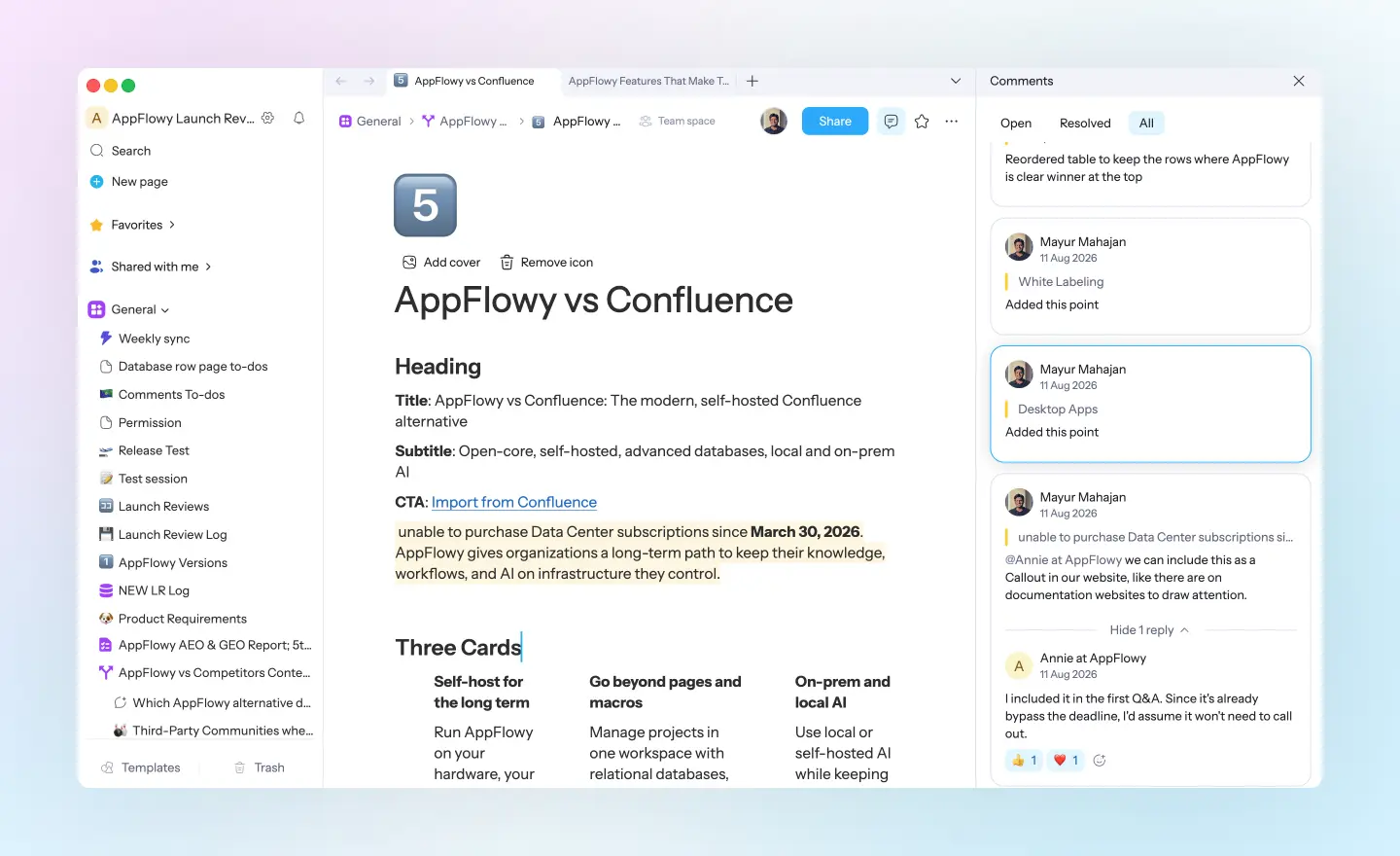
Inline comments in AppFlowy let users select a specific block in a document and attach a comment to it. Comments can include text, emojis, and user mentions. Any block with a comment is highlighted in yellow, so it's easy to see which parts of a page are being discussed.
How do inline comments work?
All comments on a page appear in a dedicated side panel, organized into three tabs: Open, Resolved, and All. Team members can reply to a comment to create a thread, which keeps the full conversation attached to the content it refers to. They can also react to comments with emojis.
Comment creators and page owners can mark a comment as resolved, which moves it to the Resolved tab, or delete it entirely. Inline comments are also supported on individual database row pages, so discussions about a specific task, bug, or record stay organized inside that row.
Why inline comments matter: less context switching
When feedback happens in a chat app, the conversation and the work get separated. Someone has to copy a quote, explain which paragraph they mean, and later find the thread again. Inline comments keep the discussion in AppFlowy, right next to the content, so nobody has to switch between apps to follow what's happening.
Insight: the Resolved tab is a record of decisions
Resolved comments aren't only finished tasks. Over time, they become a useful record of how and why decisions were made. If someone asks months later why a feature was removed from a spec, the discussion is still attached to that section of the document, including who was involved and what they agreed on.
Try this: discuss bugs on the bug itself
If your team tracks issues in an AppFlowy database, hold the discussion about each issue in the comments on its row page. Questions, reproduction notes, and fixes all stay in one place, and anyone who picks up the issue later has the full history.
3. Version history
What is version history in AppFlowy?
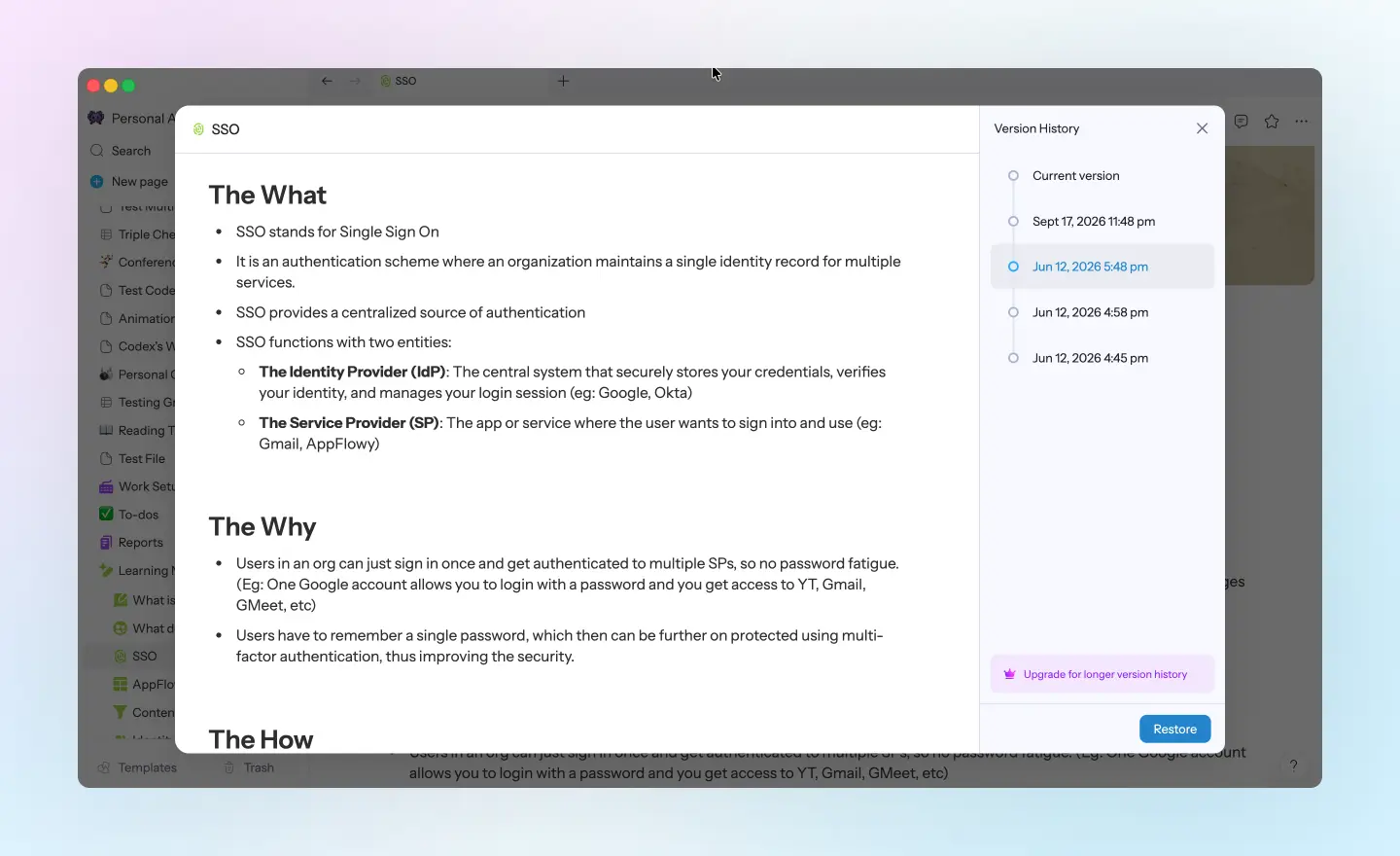
Version history in AppFlowy is a record of the different states of a page over time, showing how a document developed from its first draft to its current form. AppFlowy saves changes automatically, and users can browse and preview earlier versions in the version history panel. Any previous version can be restored as the current page with one click.
Where does version history work?
Version history is supported for all document pages in AppFlowy. No setup is required. AppFlowy saves every change automatically, including small ones, so you can review or restore earlier states whenever you need them.
Why version history matters: freedom to revise
Many teams keep extra copies of important documents before making major edits, just in case the changes don't work out. With version history, those copies aren't necessary. You can revise a section, compare it with the earlier version, and restore the original if it worked better. Knowing your work can always be recovered makes it easier to make meaningful improvements rather than cautious ones.
Try this: review what changed before a meeting
Before a weekly review, open the version history panel and preview the page as it looked at your last meeting. It's a quick way to see what's been updated, so the discussion can focus on the new changes.
4. User mentions
What are user mentions in AppFlowy?
User mentions in AppFlowy let you tag any workspace member or guest editor by typing @ or using the /person slash command. The mentioned person automatically receives an email and a push notification. User mentions work in documents and inside inline comments.
Why user mentions matter: sharing context quickly
A mention does more than notify someone. It points them to a specific block on a specific page, so they arrive with the context they need instead of searching for what you meant. This is especially helpful for distributed teams, where a mention can be picked up whenever the other person starts their day.
Try this: request approval from guests
Because guest editors can be mentioned too, user mentions work well for client projects and external partners. Mention a client directly on the section that needs their approval, and they'll be notified and taken straight to it, without a separate email thread explaining where to look.
Putting it together: a PRD review in AppFlowy
Here's how the four features might work together during a typical week:
- Monday: The product manager drafts the PRD, then adds an inline comment on the API section and mentions the lead engineer with a question about feasibility.
- Tuesday: The engineer receives a notification, replies in the comment thread, and suggests a change. The product manager and designer then update the user flow section together in real time.
- Wednesday: As questions are answered, the team resolves the related comments, building a record of the decisions made.
- Thursday: The team realizes a section removed on Tuesday is still needed. The product manager opens version history, finds the earlier version, and restores it.
The team never needed to leave AppFlowy, and the full context of the project is kept alongside the work.
Conclusion: keep the work and the conversation together
Good collaboration depends on context: knowing what changed, why it changed, and who needs to weigh in. AppFlowy's collaboration features are built to keep that context in one place. Real-time collaborative editing lets your team work on the same page at once. Inline comments keep feedback attached to the content it refers to. Version history makes it easy to revise with confidence, and user mentions bring the right people in at the right moment.
Each feature is useful by itself, but together they give teams a single workspace where the work, the discussion, and the history stay connected. To see how it fits your team, invite a few teammates to an AppFlowy workspace and try one of the ideas from this post in your next project.
Frequently asked questions
Does AppFlowy support real-time collaboration?
Yes. AppFlowy supports real-time collaborative editing, allowing multiple users to view and edit the same page at the same time. Live cursors and user avatars show who is currently active on the page.
How does AppFlowy handle multiple people editing at the same time?
AppFlowy uses CRDTs (conflict-free replicated data types) through Yrs, the Rust implementation of Yjs. Edits are cached locally first and then synced, with AppFlowy resolving the page's global state almost instantly so users don't overwrite each other's changes.
Can I comment on specific parts of a document in AppFlowy?
Yes. AppFlowy's inline comments let you attach comments to specific blocks in a document. Commented blocks are highlighted in yellow, and all comments appear in a side panel organized into Open, Resolved, and All tabs.
Can I comment on database rows in AppFlowy?
Yes. Inline comments are supported on individual database row pages, so discussions about a specific task or record stay attached to that row.
Can I restore an older version of a page in AppFlowy?
Yes. AppFlowy's version history automatically saves changes to your pages. You can browse and preview earlier versions in the version history panel and restore any of them with one click.
Do I need to turn on version history in AppFlowy?
No. Version history works automatically, with no setup required. AppFlowy saves changes as you work.
How do I mention someone in AppFlowy?
Type @ or use the /person slash command, then select a workspace member or guest editor. The person you mention receives an email, an in-app notification on all AppFlowy clients, and a push notification on mobile. Mentions work in documents and in inline comments.
Can I mention guest editors in AppFlowy?
Yes. You can mention both workspace members and guest editors, which makes mentions useful for working with clients and external collaborators.
Is AppFlowy a good Notion alternative in terms of collaborative features?
Yes. AppFlowy covers the collaboration features most teams rely on day to day: real-time collaborative editing with live cursors, inline comments with threaded replies and resolve states, automatic version history with one-click restore, and user mentions that notify members and guest editors by email and push notification. Inline comments extend to individual database row pages, so discussions about a specific task or record stay attached to that row. Read more about how the two compare in AppFlowy vs Notion.