Hey there,
v0.11.4 is out! This release brings a powerful set of new features to the desktop app:
- Chart view: Create bar, line, and donut charts directly from your databases.
- Feed view: Scroll through database entries in a continuous stream.
- Database page templates: Start with a predefined template to save time.
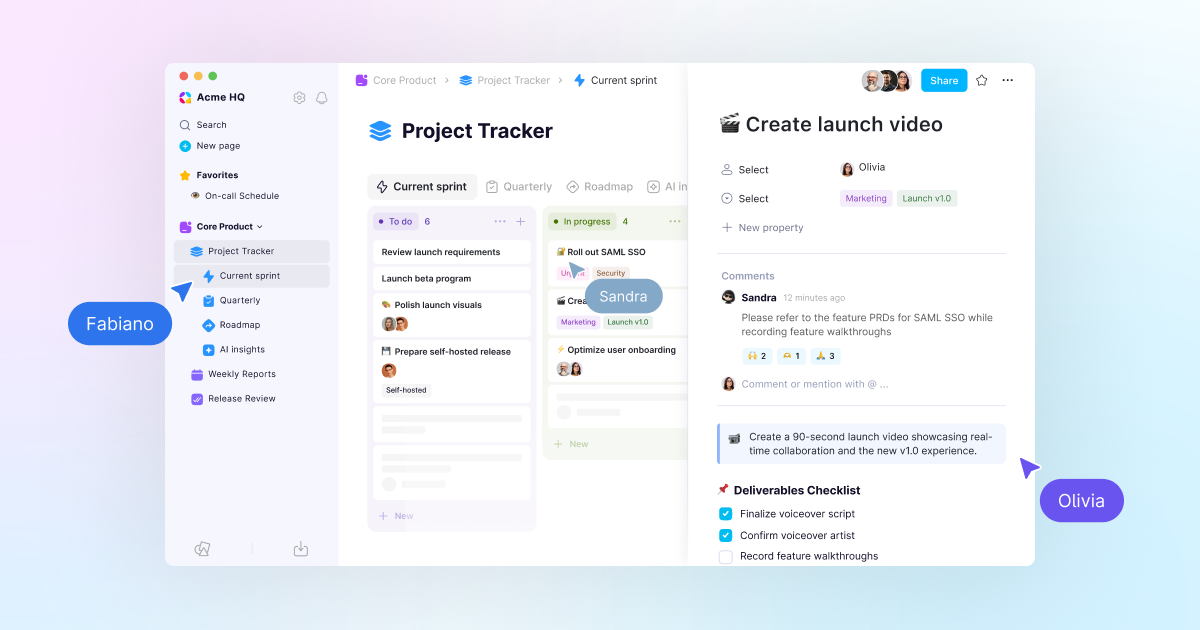
- Database page comments: Keep feedback and discussions where the work happens.
📊 Chart view: Turn your data into visual insights
- Bar, line, and donut charts: Build the right chart for your data, right inside AppFlowy.
- Drill down instantly: Click any data point to see the entries behind the numbers.
- Free tier: Create unlimited vertical bar charts on the Free plan. All chart types are available to Pro users.
💬 Database page comments
Give feedback and keep team discussions where the work happens.
- Add comments directly to database pages.
- Tag teammates with @mentions.
- Add emoji reactions to communicate quickly.
✨ Database page templates
Use a predefined template to save time and keep your work consistent.
- Create templates for new rows and cards in databases.
- Start every bug report with the same predefined sections.
- Create standup reports that already contain an AI Meeting Note block.
🆕 Feed view
Feed view gives you a continuous, scroll-friendly way to browse your database. It is perfect for staying on top of updates without losing context: open a stream and scan every entry at a glance.
🎉 Other exciting new features
- Revamped Slash Menu: A redesigned
/command menu with an improved layout helps you find tools faster. - Web Bookmark Block: Use
/bookto turn URLs into visual cards with site titles, descriptions, and thumbnails. - Text and Background Color Block: Quickly set the color of the current line from the slash menu to highlight important information.
- Export as PDF with subpages (Pro): Export a main page and all its mentioned subpages in one go for easier sharing.
- Editor Block Spacing: Enjoy a cleaner writing experience with optimized spacing between blocks in the document editor.
📒 Self-hosted updates and tutorial
- Configure LLM providers from the self-hosted admin interface at
/console. - Watch the self-hosted guest editor tutorial.
🔥 Upcoming releases
- Database row pages that can be mentioned, shared, favorited, and linked.
- AI Meeting Notes with Google Calendar.
- AI transcripts generated from a YouTube link.
- Document page version history.
🛠️ Work in progress
- AI mini chat in documents with web search.
- Document page comments.
Until next time,
The AppFlowy Team