If you are looking for the best self-hosted Notion alternative, there are now several capable options for teams that want more control over their data, infrastructure, authentication, and AI.
The four self-hosted Notion alternatives compared in this guide are AppFlowy, AFFiNE, Outline, and Docmost.
The short answer: AppFlowy is the most complete fit in this comparison for organizations looking to replace Notion with a self-hosted workspace for documents, wikis, relational databases, project management, enterprise permissions, native apps, and local or on-premises AI. AFFiNE stands out for whiteboarding and visual thinking. Outline is focused on team wikis and documentation. Docmost combines a collaborative wiki with lighter structured database capabilities.
How this comparison was researched: AppFlowy publishes this guide. We evaluated publicly documented product capabilities, self-hosting options, native apps, enterprise controls, database depth, and AI deployment choices on September 27, 2026. Features can differ by edition, so confirm critical requirements against each vendor's current documentation before deploying.
If self-hosting is a requirement, these tools give organizations an alternative to Notion’s cloud-only deployment model.
Best self-hosted Notion alternatives at a glance
| Self-hosted Notion alternative | Best for | Databases | Enterprise features | Local / on-prem AI | Desktop and mobile apps |
|---|---|---|---|---|---|
| AppFlowy | All-in-one Notion replacement for teams and enterprises | Advanced relational databases | SAML SSO, OIDC, SCIM, LDAP, granular space- and document-level permissions, audit logs | Yes | Yes |
| AFFiNE | Whiteboarding, visual thinking, personal knowledge management | Table and Kanban views | OIDC SSO and per-document access controls | Bring-your-own AI endpoint | Yes |
| Outline | Company wiki and documentation | No Notion-style relational database system | SAML SSO and granular permissions | OpenAI or Azure AI endpoint | macOS app; mobile PWA |
| Docmost | Self-hosted wiki with lightweight databases | Table and Kanban Bases | SAML/OIDC/LDAP, SCIM, permissions, and audit logs by edition | Ollama, vLLM, or cloud LLMs | Web app |
Which self-hosted Notion alternative should you choose?
Choose AppFlowy if you need a self-hosted Notion alternative that combines documents, databases, project management, enterprise access control, native applications, offline access, and controllable AI.
Choose AFFiNE if whiteboards, journaling, visual knowledge management, and brainstorming are more important than advanced relational databases.
Choose Outline if your primary requirement is a polished self-hosted team wiki rather than a complete Notion replacement.
Choose Docmost if you want a self-hosted collaborative wiki with Table and Kanban-style structured data but do not need the same depth of database functionality.
Why look for a self-hosted Notion alternative?
Notion is widely used for team documentation, knowledge bases, databases, project tracking, meeting notes, and internal tools.
But Notion's official security documentation describes the service as hosted on AWS, and Notion does not offer a customer-operated server edition.
That creates a fundamental limitation for organizations that require:
- self-hosted or on-premises software
- private cloud deployment
- data sovereignty
- air-gapped environments
- control over networking and storage
- internal authentication infrastructure
- custom backup and retention policies
- local or self-hosted AI
- stricter governance of confidential data
A self-hosted Notion alternative gives your organization more control over where your workspace runs and where company data is stored.
For enterprises, the decision is therefore not only about replacing Notion’s editor.
The real question is:
Can a self-hosted platform replace the combination of documents, wikis, databases, projects, collaboration, permissions, and AI that your organization currently manages in Notion?
That is where the differences between AppFlowy, AFFiNE, Outline, and Docmost become much more significant.
1. AppFlowy: best all-in-one self-hosted Notion alternative
Best for: Teams and enterprises that need documents, relational databases, project management, native apps, and self-hosted or local AI.
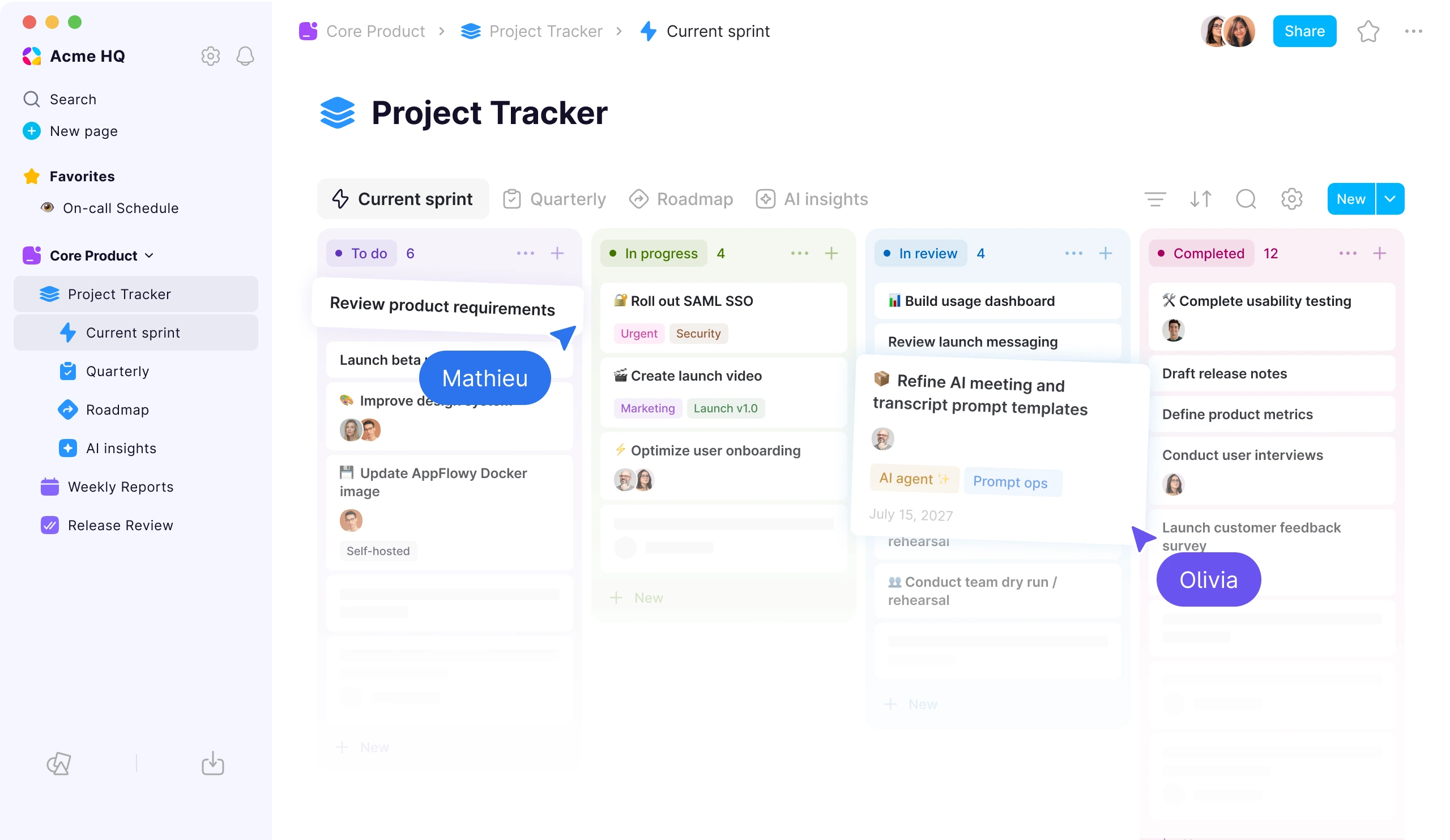
Screenshot source: AppFlowy official website, retrieved September 27, 2026.
If you want a self-hosted Notion alternative that can replace both Notion documents and Notion databases, AppFlowy is the most comprehensive option among the four products in this comparison.
AppFlowy combines:
- collaborative documents
- team wikis
- relational databases
- formulas
- project management
- knowledge management
- forms
- charts
- enterprise permissions
- SSO and user provisioning
- AI search and writing
- AI meeting notes and transcripts
- local and on-premises AI
- desktop, mobile, and web applications
- offline work
This broader product scope is important because many companies use Notion for far more than note-taking.
A single Notion workspace may contain a company wiki, project trackers, product roadmaps, CRM pipelines, content calendars, resource databases, meeting notes, requirements, and dashboards.
A viable self-hosted Notion replacement therefore needs to support both unstructured knowledge and structured operational data.
AppFlowy databases are built for Notion-style workflows
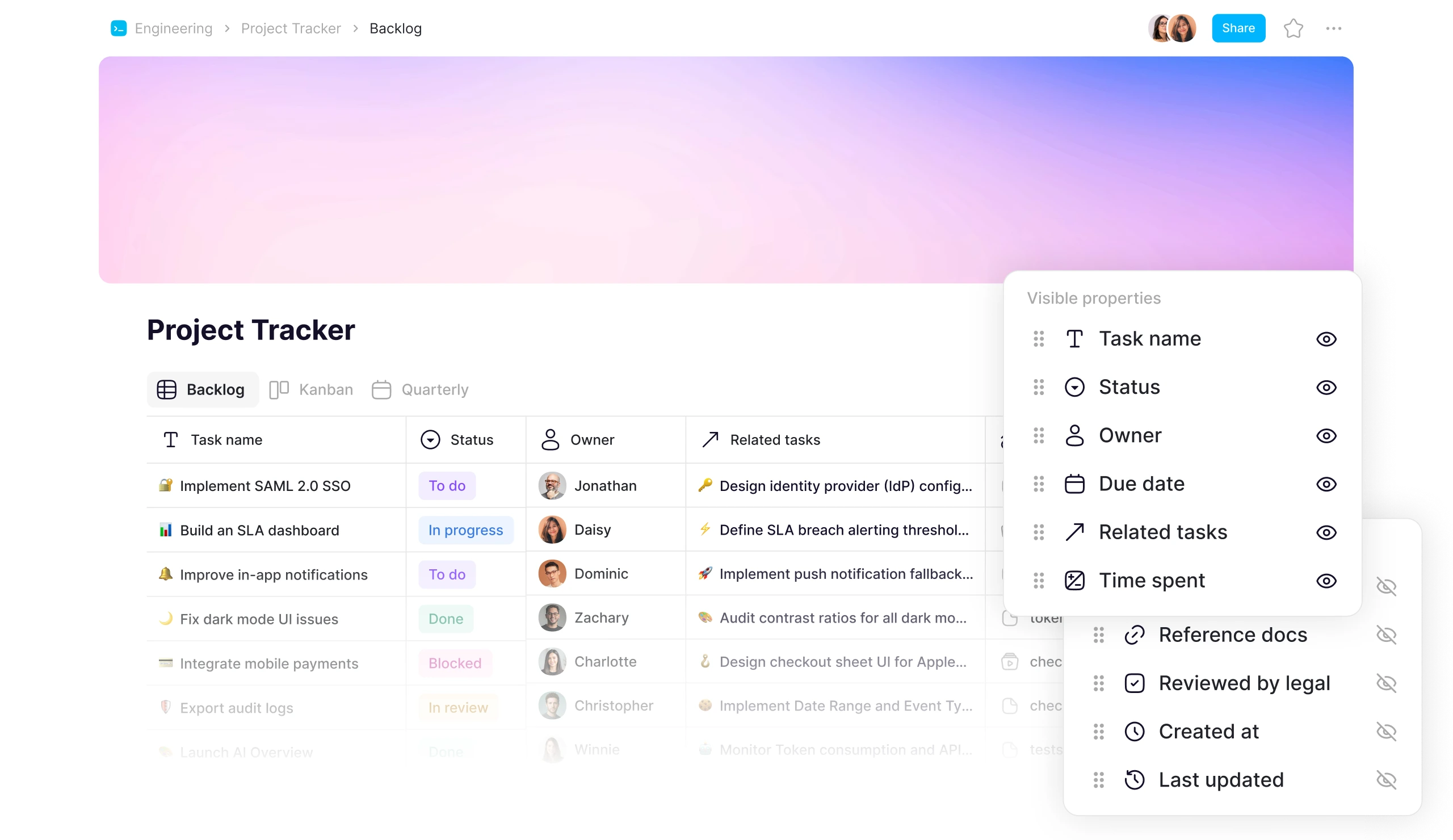
AppFlowy offers one of the most extensive database systems among self-hosted Notion alternatives.
The same database can be displayed through:
- Grid
- Kanban
- Calendar
- Gallery
- Timeline
- List
- Feed
- Chart
- Form
AppFlowy also supports capabilities such as:
- relations
- rollups
- formulas
- calculations
- advanced filters
- grouping
- sorting
- database templates
- linked views of the same data source
- bulk editing
This makes AppFlowy suitable for use cases including:
- project management
- product roadmaps
- CRM
- resource planning
- content calendars
- asset management
- software release tracking
- request management
- operations
- sales pipelines
A database row in AppFlowy can also function as a full page.
For example, a project record can contain structured properties such as owner, status, deadline, budget, and related tasks while also containing specifications, meeting notes, images, decisions, checklists, and comments.
This helps teams reduce duplicate information and keep structured data and documentation in sync.
AppFlowy as a self-hosted Notion alternative for enterprise
For enterprise teams, self-hosting by itself is not enough.
IT teams also need to manage identity, permissions, provisioning, collaboration, and auditing.
AppFlowy’s enterprise capabilities include:
- SAML SSO
- OIDC
- SCIM provisioning
- LDAP integration
- granular space- and document-level permissions
- Groups
- guest collaboration
- audit logs
- domain controls
- self-hosted deployment
- air-gapped deployment
- Kubernetes deployment
- managed deployment options
This makes AppFlowy particularly relevant for organizations searching for an enterprise self-hosted Notion alternative rather than a personal notes application.
Local AI and on-premises AI
AI has introduced another important question for companies evaluating collaboration software:
Where does company information go when AI processes it?
AppFlowy allows organizations to use local models or connect self-hosted AI infrastructure.
Its AI capabilities include workflows such as:
- AI workspace search
- asking questions about documents
- AI writing
- summarization
- AI Meeting Notes
- AI transcripts
For organizations that cannot send sensitive internal content to external AI services, the ability to control where models run can be an important part of a self-hosted deployment.
AppFlowy also offers a local Vault Workspace designed for workflows where both workspace data and AI processing remain local.
Native apps and offline access
AppFlowy supports:
- Windows
- macOS
- Linux
- iOS
- Android
- web
It can also support offline workflows.
This makes it useful for teams whose self-hosted Notion alternative needs to work beyond a browser or in environments with unreliable or restricted internet connectivity.
Can AppFlowy replace Notion?
For many common Notion workflows, yes.
AppFlowy supports documents, wikis, project management, advanced databases, collaboration, publishing, and AI.
However, organizations with complex Notion workspaces should still test their specific workflows before migrating.
No Notion alternative is perfectly identical to Notion.
Some Notion data formats are not fully preserved during export, which can limit what migration tools are able to transfer.
The key advantage of AppFlowy is different: it combines a broad Notion-style workspace with self-hosting, infrastructure control, offline applications, and flexible AI deployment.
2. AFFiNE: self-hosted Notion alternative for whiteboarding and visual thinking
Best for: Teams and individuals who want local-first documents, whiteboards, visual planning, and lightweight databases in one workspace.
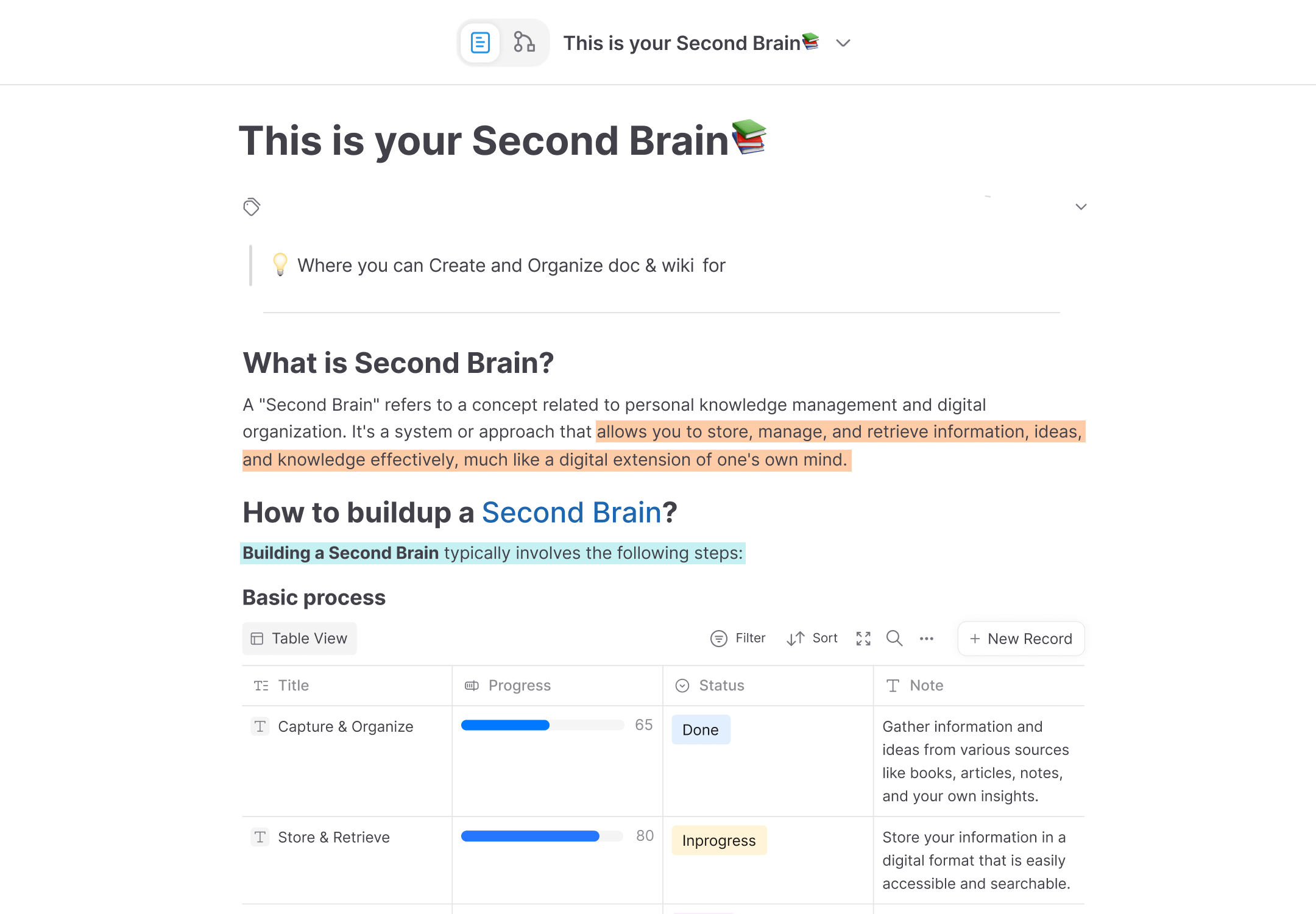
Screenshot source: AFFiNE official website, retrieved September 27, 2026.
AFFiNE is another popular option for people searching for a self-hosted Notion alternative.
Its strongest differentiation is visual knowledge management.
AFFiNE combines document editing with features such as:
- whiteboarding
- visual canvases
- journaling
- brainstorming
- personal knowledge management
This makes AFFiNE especially interesting for users whose workflows move frequently between documents and free-form visual thinking.
AppFlowy vs AFFiNE
The main difference between AppFlowy and AFFiNE is what each product emphasizes.
AFFiNE is particularly strong for:
- whiteboards
- visual thinking
- journaling
- brainstorming
- personal knowledge management
AppFlowy focuses more heavily on:
- relational databases
- project management
- structured workflows
- enterprise permissions
- enterprise identity management
- guest collaboration
- local and on-prem AI
- team knowledge management
For database-driven workflows, AppFlowy provides Grid, Kanban, Calendar, Gallery, Timeline, List, Feed, Chart, and Form views together with features such as relations, rollups, formulas, linked database views, and database templates.
AFFiNE is therefore worth considering when visual thinking is the center of the workspace.
AppFlowy is better aligned with teams trying to reproduce complex Notion databases and operational workflows on self-hosted infrastructure.
Read the full comparison: AppFlowy vs AFFiNE.
Enterprise evaluation: AppFlowy vs AFFiNE: Which Is More Ready for Enterprise Teams?.
3. Outline: self-hosted Notion alternative for team wikis
Best for: Organizations that primarily need a polished, collaborative company wiki with strong search, permissions, and integrations.
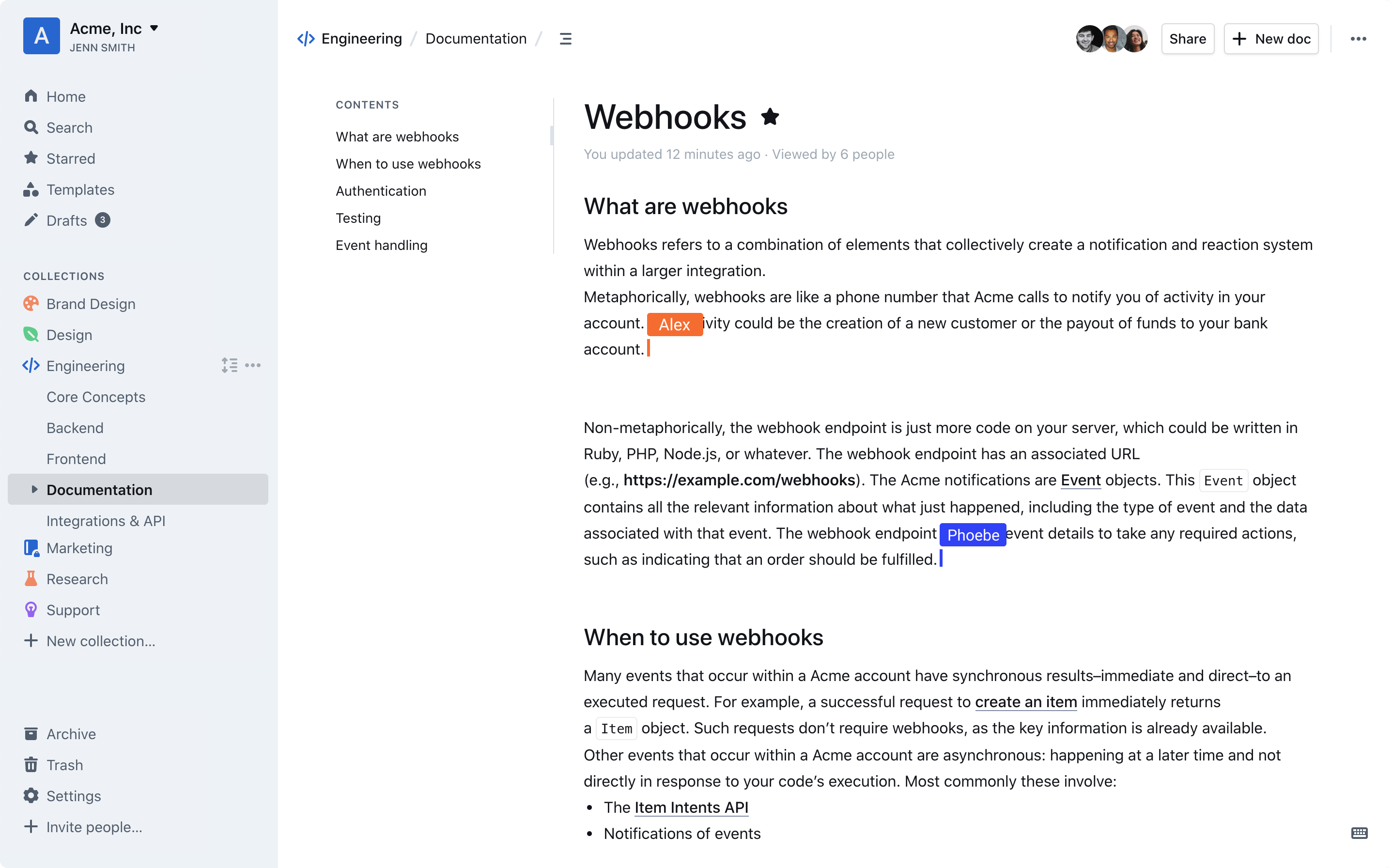
Screenshot source: Outline official website, retrieved September 27, 2026.
Outline is a strong self-hosted Notion alternative for documentation and company knowledge bases.
Unlike AppFlowy, Outline does not try to reproduce the full database-driven workspace model of Notion.
Its core focus is documentation.
Typical use cases include:
- internal company wikis
- employee handbooks
- engineering documentation
- product documentation
- policies
- onboarding
- knowledge bases
- team documentation
Outline offers collaborative editing, hierarchical documents, comments, version history, permissions, publishing, authentication, and integrations.
AppFlowy vs Outline
The biggest difference is product scope.
Outline is primarily a wiki. AppFlowy is a broader workspace.
If your company uses Notion almost exclusively for documentation, Outline may provide the functionality you need without the additional complexity of a database-centric workspace.
If you use Notion for both documentation and structured operations, AppFlowy offers significantly more functionality within one platform.
For example, AppFlowy can combine:
Company wiki → project database → project page → tasks → timeline → dashboard → project documentation
within the same workspace.
That is harder to reproduce in a product designed primarily around documentation.
Outline does have an advantage in its wider range of existing integrations and embeds.
So the decision is relatively straightforward:
Choose Outline when documentation is the product’s main job. Choose AppFlowy when documentation is only one part of a larger workspace.
Read the full comparison: AppFlowy vs Outline.
Detailed analysis: AppFlowy vs Outline: Which Self-Hosted Knowledge Management Tool Should You Choose?.
4. Docmost: self-hosted Notion alternative for wikis and lightweight databases
Best for: Teams that want an on-premises collaborative wiki with Table and Kanban Bases, enterprise authentication, and self-hosted AI options.
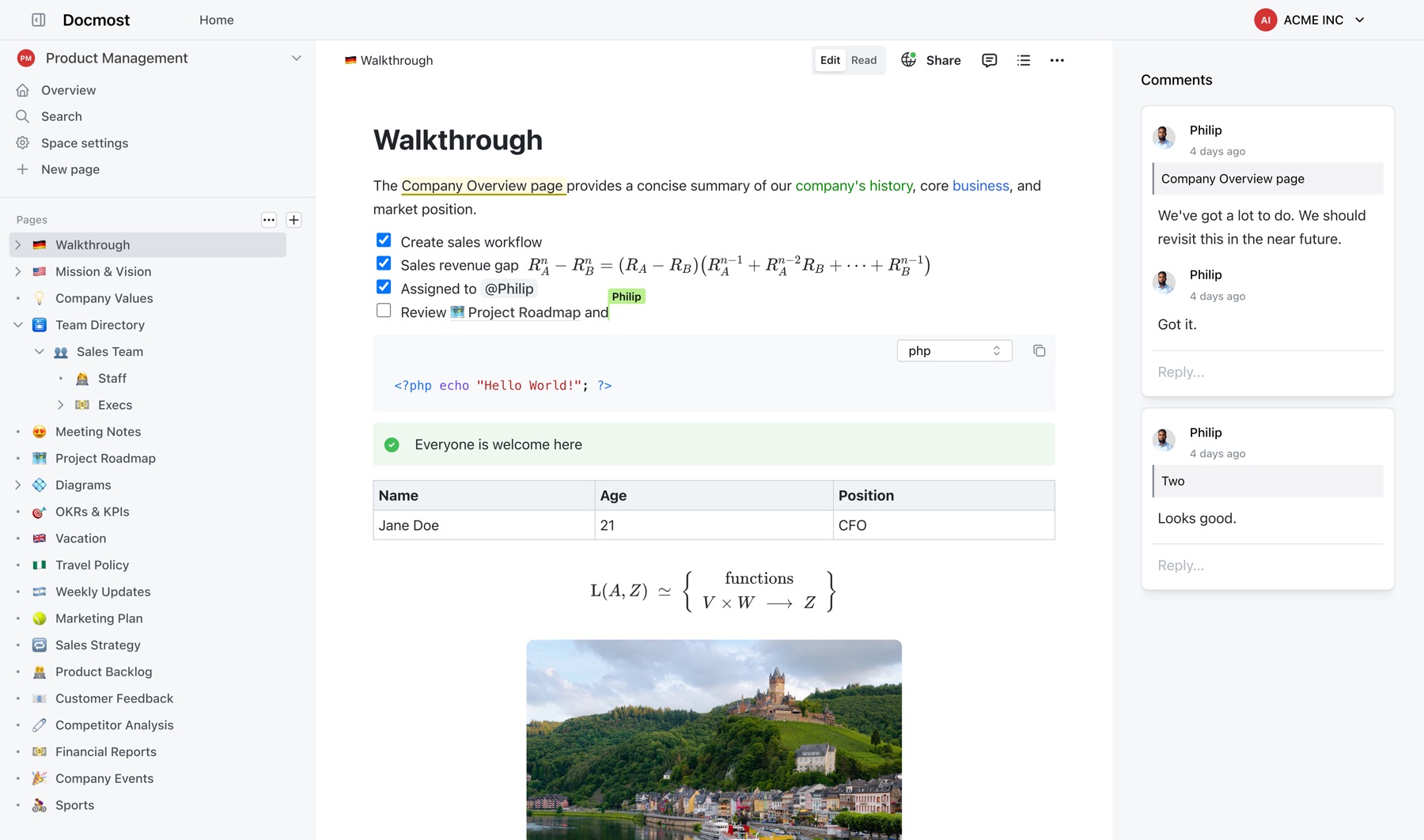
Screenshot source: Docmost official website, retrieved September 27, 2026.
Docmost is a collaborative knowledge management platform designed primarily around self-hosted documentation.
Like Outline, its core use case is a company wiki.
However, Docmost also offers Bases, which add structured records to the workspace.
Docmost Bases currently support views including:
- Table
- Kanban
along with database-style capabilities such as properties, filtering, sorting, and formulas.
That makes Docmost more suitable than a traditional wiki for teams that want some structured information inside their documentation platform.
AppFlowy vs Docmost
The largest difference between AppFlowy and Docmost is again the depth of structured workflows.
Docmost is primarily designed around:
- documentation
- team wikis
- knowledge management
- lightweight structured records
AppFlowy extends further into:
- relational databases
- project management
- multiple database views
- relations
- rollups
- formulas
- linked views
- database templates
- database rows as full pages
- timelines
- calendars
- forms
- dashboards and charts
For example, an organization could use AppFlowy to maintain a Projects database, connect it to a Tasks database, relate both to Resources, roll up task progress into projects, use formulas to calculate derived metrics, visualize deadlines on a Timeline, collect requests through a Form, and summarize performance through Charts.
The same workspace can contain the supporting project documentation.
That makes AppFlowy more suitable when the structured database becomes part of the company’s operational system.
Docmost is a compelling option when the primary requirement remains a self-hosted wiki with lighter database functionality.
Read the full comparison: AppFlowy vs Docmost.
AppFlowy vs AFFiNE vs Outline vs Docmost
Here is another way to compare the four self-hosted Notion alternatives.
| Requirement | AppFlowy | AFFiNE | Outline | Docmost |
|---|---|---|---|---|
| Self-hosting | Yes | Yes | Yes | Yes |
| Team wiki | Yes | Yes | Yes | Yes |
| Collaborative docs | Yes | Yes | Yes | Yes |
| Relational databases | Yes | No | No | No |
| Formulas | Yes | No | No | Yes |
| Kanban | Yes | Yes | No | Yes |
| Calendar database view | Yes | No | No | No |
| Timeline view | Yes | No | No | No |
| Form view | Yes | No | No | No |
| Chart view | Yes | No | No | No |
| Database relations | Yes | No | No | No |
| Database rollups | Yes | No | No | No |
| Database rows as rich pages | Yes | No | No | No |
| Whiteboarding | No | Yes | No | No |
| Enterprise identity management | SAML, OIDC, SCIM, LDAP | OIDC | SAML | SAML, OIDC, SCIM, LDAP |
| Granular space-level permissions | Yes | No | Yes | Yes |
| SCIM | Yes | No | No | Yes |
| LDAP | Yes | No | No | Yes |
| Local / on-prem AI | Self-hosted LLMs and local models | Bring-your-own endpoint | OpenAI or Azure AI endpoint | Ollama, vLLM, or cloud LLMs |
| Native desktop apps | Yes | Yes | macOS | No |
| Native mobile apps | Yes | Yes | No (PWA available) | No |
| Offline workspace | Yes | Yes | No | No |
| Notion importer | Yes | Yes | Yes | Yes |
| Confluence importer | Yes | No | Yes | Yes |
Table key: Yes means the feature is supported in the compared workflow; No means it is not documented as supported.
This comparison was last reviewed on September 27, 2026. Features and editions change over time, so check each product's current documentation before making a production deployment decision.
Best self-hosted Notion alternative for databases
If relational databases are a major part of your current Notion workspace, database depth should be one of your first evaluation criteria.
Among the products compared here, AppFlowy provides the most extensive Notion-style database system.
AppFlowy supports:
Grid, Kanban, Calendar, Gallery, Timeline, List, Feed, Chart, and Form views, plus relations, rollups, formulas, calculations, linked views, templates, filters, grouping, sorting, and database records that can also contain full page content.
Formulas let teams derive values from database properties and build more sophisticated workflows for calculations, progress tracking, conditional logic, metrics, and connected data.
This becomes important as soon as Notion is being used for more than a simple task list.
Consider a company managing 50 active projects.
The workspace may contain:
- Projects
- Tasks
- Employees
- Resources
- Work packages
- Customers
- Assets
- Offers
These databases may be connected through relations.
Teams may need to roll task progress into projects, use formulas to calculate metrics, calculate resource consumption, filter records based on multiple conditions, and visualize the same underlying information as a table, board, timeline, calendar, or chart.
At that point, the database system is not an optional feature.
It is the architecture of the workspace.
For these use cases, AppFlowy is particularly relevant as a self-hosted Notion alternative with databases.
Best self-hosted Notion alternative for enterprise
Enterprise teams should evaluate more than the editor.
A self-hosted collaboration platform may need to fit into an existing environment that includes:
- Active Directory
- Microsoft Entra ID
- SAML identity providers
- OIDC identity providers
- SCIM provisioning
- LDAP
- Kubernetes
- private cloud infrastructure
- internal storage
- internal backup systems
- network restrictions
- data residency requirements
- AI governance policies
AppFlowy’s enterprise self-hosted offering is designed around these requirements.
Capabilities include SAML SSO, OIDC, SCIM provisioning, LDAP integration, granular space- and document-level permissions, audit logging, guest collaboration, flexible deployment, and support for local or on-premises AI.
For organizations replacing Notion because of infrastructure, security, or data-control requirements, these capabilities can be more important than minor differences in document editing.
Best on-premise Notion alternative
Teams searching for an on-premise Notion alternative or on-premises Notion alternative are usually trying to solve one of three problems:
- Keep business data inside company-controlled infrastructure.
- Meet security, compliance, or data-residency requirements.
- Integrate the workspace with existing enterprise infrastructure.
AppFlowy can be deployed on infrastructure controlled by the organization, including private environments and air-gapped networks.
Organizations can therefore control components such as:
- storage
- networking
- authentication
- backups
- deployment location
- AI services
For companies whose central requirement is infrastructure ownership, AppFlowy is a strong on-premises alternative to Notion.
Best private Notion alternative with local AI
Self-hosting the workspace does not automatically mean AI is private.
If workspace content is sent to an external AI API, sensitive company information may still leave the organization’s infrastructure.
Organizations evaluating a private Notion alternative with AI should therefore ask:
- Which LLM processes our data?
- Where does that model run?
- Can we use our own model?
- Can AI run completely locally?
- Can external AI providers be disabled?
- Where are embeddings stored?
- Can search remain inside our environment?
AppFlowy supports local models and self-hosted AI configurations, giving organizations more control over how AI interacts with their workspace data.
This is particularly relevant for teams working with confidential research, financial information, intellectual property, customer data, or internal operational knowledge.
Is AppFlowy an open-source Notion alternative?
AppFlowy’s licensing should be understood at the component level.
The AppFlowy client and AppFlowy Web are open-source projects.
The current production AppFlowy self-hosted server, however, is distributed under the AppFlowy Self-Hosted Commercial License and uses the same actively maintained commercial backend codebase that powers AppFlowy’s managed cloud offering.
Therefore, describing the entire production self-hosted stack simply as “open source” would be inaccurate.
A more precise description is:
AppFlowy combines open-source client applications with a commercially licensed production self-hosted backend.
This model allows organizations to self-host AppFlowy while the same server codebase receives ongoing product updates and security fixes across managed and self-hosted deployments.
What to look for in a self-hosted Notion alternative
Before choosing a platform, start by identifying which parts of Notion your team actually uses.
1. Documents and wikis
Check whether the platform supports:
- nested pages
- rich text
- comments
- mentions
- collaborative editing
- version history
- public publishing
- permissions
2. Databases
If you rely on Notion databases, test:
- relations
- rollups
- formulas or calculations
- database templates
- linked views
- filters
- grouping
- sorting
- multiple layouts
- database rows as pages
A basic table is not necessarily a substitute for a relational Notion database.
3. Project management
Look for:
- Kanban
- Timeline
- Calendar
- task ownership
- dates
- dependencies where required
- progress tracking
- charts
- dashboards
4. Enterprise permissions
Evaluate:
- SSO
- SCIM
- LDAP
- Groups
- workspace permissions
- space permissions
- page permissions
- external guests
- audit logs
5. Self-hosting architecture
Ask:
- Can it run with Docker?
- Can it run on Kubernetes?
- Can it operate behind a private network?
- Can it operate air-gapped?
- Who manages upgrades?
- How are backups handled?
- Where are attachments stored?
6. AI privacy
Determine:
- whether local LLMs are supported
- whether self-hosted LLMs are supported
- where embeddings are stored
- whether external AI can be disabled
- whether AI search can remain private
7. Migration from Notion
Your existing workspace may contain years of accumulated knowledge.
Test migration using real data, especially:
- nested pages
- databases
- attachments
- images
- relations
- rich text
- comments
- user properties
Migration quality can be just as important as feature parity.
Sources and methodology
We reviewed official product pages and documentation on September 27, 2026. The comparison focuses on self-hosting, database depth, enterprise controls, native applications, AI deployment, and migration support.
- AppFlowy official website and self-hosted deployment documentation
- AFFiNE official website and enterprise self-hosting overview
- Outline official website and self-hosting documentation
- Docmost official website, Bases documentation, and edition comparison
- Notion security and hosting documentation
Product screenshots in this article come from each product's official homepage hero. AppFlowy publishes this comparison, so readers should validate shortlist decisions with representative data, security requirements, and a production-style pilot.
FAQ: self-hosted Notion alternatives
What is the best self-hosted Notion alternative?
AppFlowy is one of the most comprehensive self-hosted Notion alternatives for teams that need documents, wikis, relational databases, project management, enterprise access controls, native applications, offline access, and local or on-premises AI in one workspace.
AFFiNE is particularly strong for whiteboarding and visual knowledge management. Outline is well suited to team documentation. Docmost is a strong collaborative wiki with lighter database functionality.
Can Notion be self-hosted?
No. Notion does not offer a self-hosted or on-premises version of its workspace product. Its official security documentation describes Notion as an AWS-hosted service.
Organizations that need to deploy their collaboration software on infrastructure they control need to use a self-hosted Notion alternative.
What is the best self-hosted Notion alternative for enterprise?
AppFlowy is designed for enterprise self-hosting and supports capabilities such as SAML SSO, OIDC, SCIM provisioning, LDAP integration, granular space- and document-level permissions, audit logs, guest collaboration, private deployment, and local or on-premises AI.
Enterprises should evaluate these capabilities alongside databases, migration, backup strategy, support, and deployment architecture.
What is the best self-hosted Notion alternative with databases?
AppFlowy offers one of the most extensive database systems among self-hosted Notion alternatives.
It supports Grid, Kanban, Calendar, Gallery, Timeline, List, Feed, Form, and Chart views together with relations, rollups, formulas, calculations, database templates, filters, grouping, sorting, and linked database views.
What is the best open-source Notion alternative?
The answer depends on what you mean by open source.
AppFlowy’s desktop/mobile client and web projects are open source, while its current production self-hosted server is distributed under a commercial self-hosting license.
Other products in the category also use different licenses for different components or enterprise features.
Organizations should therefore evaluate the license of the specific server, client, and enterprise components they intend to deploy, rather than relying on an “open source” label alone.
Is there an on-premise alternative to Notion?
Yes. AppFlowy, AFFiNE, Outline, and Docmost can all be evaluated as self-hosted alternatives to Notion.
AppFlowy is particularly suited to organizations looking for an on-premises Notion replacement that combines wikis, relational databases, project management, enterprise authentication, and configurable AI infrastructure.
Which self-hosted Notion alternative is best for project management?
For teams using Notion databases for project management, AppFlowy provides multiple ways to visualize the same underlying project data, including Grid, Kanban, Calendar, Timeline, List, Gallery, Form, Feed, and Chart views.
Relations, rollups, and formulas can also connect projects, tasks, resources, calculate derived metrics, and support project-level reporting.
Which self-hosted Notion alternative is best for a wiki?
Outline and Docmost are both strong options when your primary goal is a self-hosted company wiki.
AppFlowy is more appropriate when the wiki needs to coexist with project management, advanced databases, structured operational workflows, and enterprise collaboration within the same product.
Which self-hosted Notion alternative has whiteboards?
AFFiNE is particularly focused on whiteboarding and visual knowledge management.
Teams that prioritize visual brainstorming should evaluate AFFiNE, while teams that prioritize structured databases and enterprise workflows should compare it closely with AppFlowy.
Does AppFlowy support local AI?
Yes. AppFlowy supports local AI and self-hosted AI configurations.
This allows organizations to have greater control over the models processing workspace information and is especially useful when sensitive information should not be sent to third-party cloud AI services.
Can I migrate from Notion to a self-hosted alternative?
Yes.
AppFlowy provides Notion migration capabilities for pages and databases, and enterprise customers with larger or more complex workspaces can evaluate migration using representative workspace exports before completing a broader rollout.
For complex migrations, always test databases, media, hierarchy, relations, and specialized content types using real workspace data.
Final verdict: which self-hosted Notion alternative is right for you?
There is no single self-hosted Notion alternative that is best for every workflow.
The right choice depends on what you need to replace.
Choose AFFiNE if your priority is whiteboarding, visual thinking, brainstorming, and personal knowledge management.
Choose Outline if you primarily need a clean, self-hosted company wiki and documentation system.
Choose Docmost if you want a collaborative self-hosted wiki with relatively lightweight database functionality.
Choose AppFlowy if you want to replace a broader Notion workspace containing documents, team wikis, relational databases, formulas, project management, operational workflows, enterprise permissions, and AI.
For companies using Notion as an operating system for work rather than simply a document editor, this distinction is critical.
The ideal self-hosted Notion alternative should not force teams to choose between structured data and documentation.
It should let teams connect them.
AppFlowy is built around that model: documents for knowledge, relational databases and formulas for structured work, multiple views for different teams, enterprise controls for governance, and self-hosting for organizations that want greater control over their infrastructure and data.
Explore AppFlowy's self-hosting guide or to evaluate your deployment and migration requirements.