If you are comparing AppFlowy vs Confluence for an enterprise team, the decision comes down to two questions: where must the workspace run, and how much structured operational work must it manage alongside documentation?
The short answer: choose Confluence when your organization is moving to Atlassian Cloud, depends heavily on Jira and Marketplace apps, or values Confluence's mature wiki and whiteboard experience. Choose AppFlowy when long-term self-hosting, air-gapped deployment, local or on-premises AI, native desktop apps, and relational databases are central requirements.
Both products support multi-user real-time collaboration, hierarchical knowledge, comments, permissions, version history, databases, mobile access, and AI. The meaningful differences are deployment control, ecosystem depth, and how each product connects documents to structured data.
See the complete AppFlowy vs Confluence comparison for a visual feature comparison. For a broader shortlist, read Best Self-Hosted Confluence Alternatives in 2026.
Research methodology: AppFlowy publishes this comparison. We reviewed the supplied brief together with official AppFlowy and Atlassian product pages, documentation, support articles, release information, and public repositories on September 27, 2026. Product capabilities and plan limits can change, so validate critical requirements in a proof of concept.
AppFlowy vs Confluence at a glance
| Requirement | AppFlowy | Confluence |
|---|---|---|
| Primary focus | Documents, wikis, relational data, projects, and AI | Mature team wiki integrated with the Atlassian ecosystem |
| Long-term self-hosting | Docker Compose, official Helm chart, private cloud, on-premises, and air-gapped deployment | Data Center reaches end of life on March 28, 2029; Atlassian Cloud is the standard long-term path |
| Real-time collaboration | Documents and databases | Pages, live docs, databases, and supported content |
| Database layouts | Grid, Kanban, Calendar, Gallery, List, Timeline, Feed, Chart, and Form | Table, Card, and Board |
| Reusing one data source | Linked instances can keep independent filters, sorts, groups, fields, and layouts | A database or saved source view can be embedded and remains connected to its source |
| Record model | Every database record is also a full working page | An entry can link to a separate page or live doc |
| Relational reporting | Relations, rollups, and formulas | Entry links, backlinks, Entry details, and view-level calculations |
| Permissions | Workspace, Space, Group, page, member, and guest controls | Global permissions, space permissions, content restrictions, roles, and guests |
| Enterprise identity | SAML, OIDC, SCIM, and LDAP | SAML SSO and SCIM through Atlassian Guard |
| AI | Search, writing, chat, meeting notes, transcripts, database assistance, local AI, and self-hosted models | Rovo search, chat, agents, writing, summaries, and meeting insights |
| Native apps | Windows, macOS, Linux, iOS, Android, and web | Web plus native iOS and Android apps |
| Ecosystem | APIs, MCP, Zapier, and selected integrations | Deep Jira integration and thousands of Marketplace apps |
| Whiteboards | No native whiteboard | Yes |
What is the biggest difference between AppFlowy and Confluence?
The biggest difference is the operating model.
Confluence is a mature knowledge platform built around the Atlassian ecosystem. Its strongest path is Atlassian Cloud, where teams can combine pages, live docs, whiteboards, databases, Jira work items, Rovo, and Marketplace extensions. For organizations standardized on Jira, that ecosystem can be decisive.
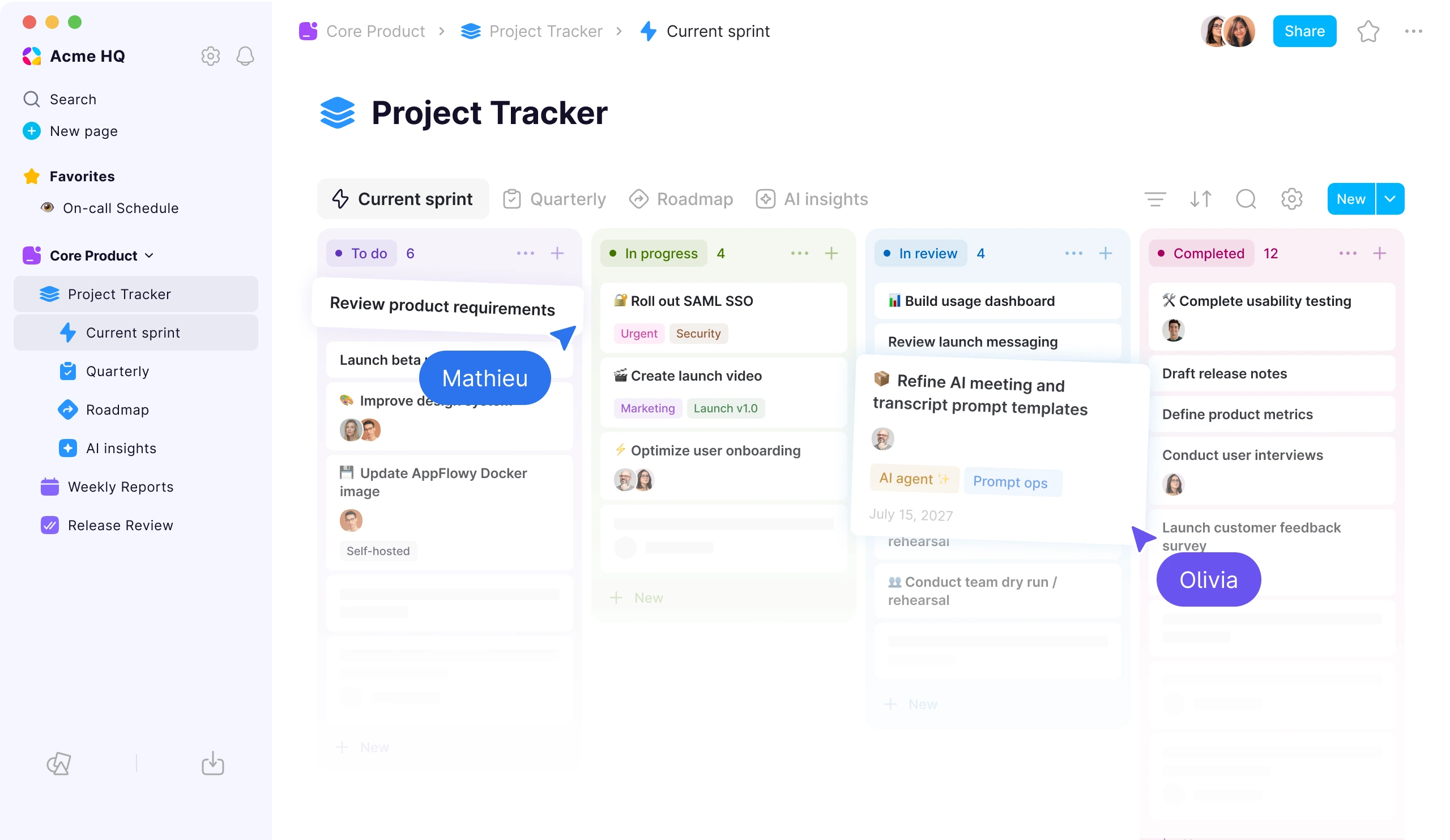
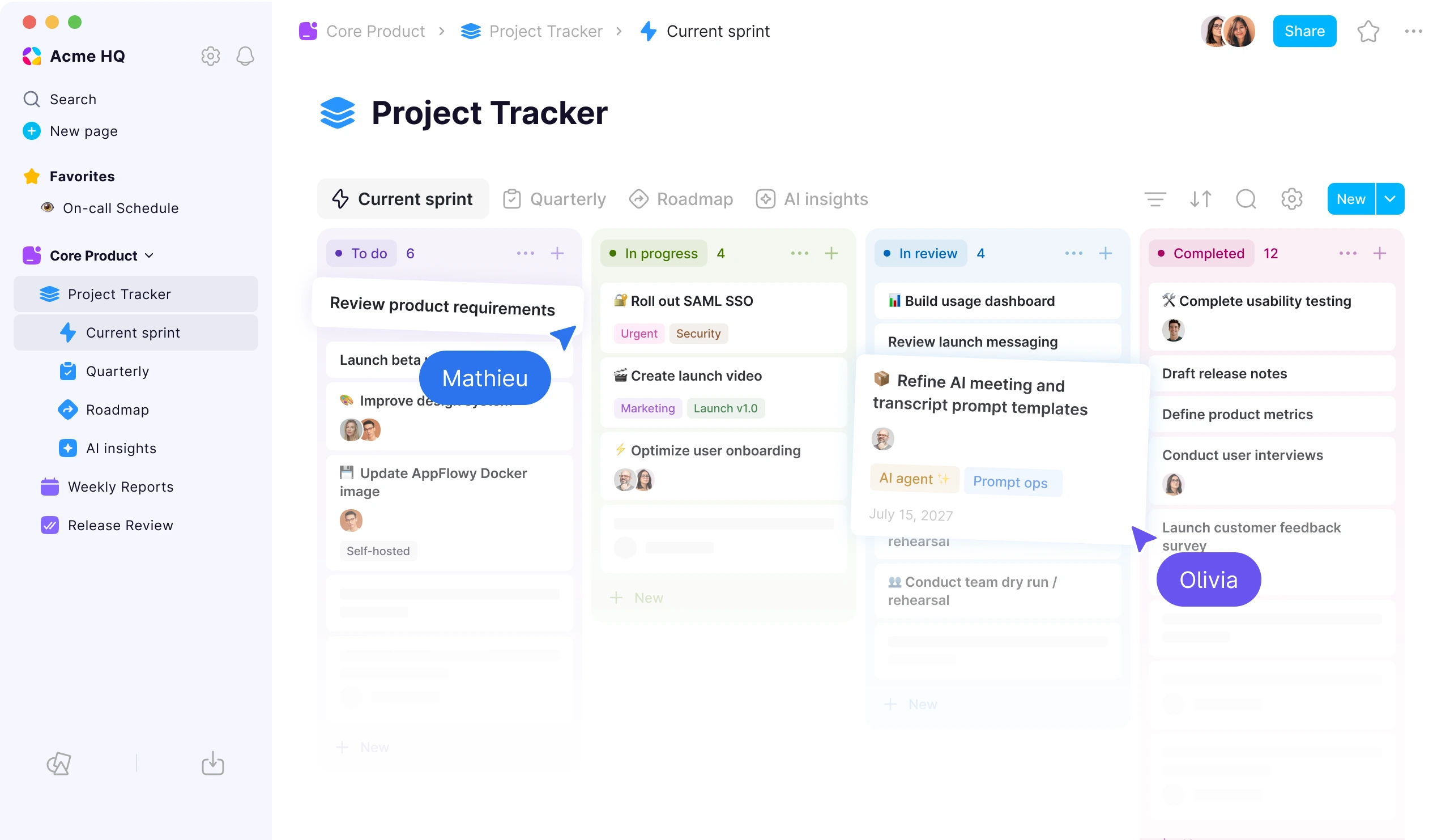
AppFlowy is an all-in-one workspace that can run in the cloud or on infrastructure the organization controls. It combines documents and wikis with relational databases, project views, forms, charts, and AI that can run locally or on-premises.
The choice is therefore not modern interface versus established wiki. It is cloud ecosystem depth versus deployment flexibility and a more integrated document-and-database model.
What does Confluence Data Center end of life mean?
Atlassian has scheduled Data Center end of life for March 28, 2029 at 23:59 PST. Under the standard lifecycle, affected subscriptions and associated Marketplace apps become read-only at that point.
| Date | Data Center milestone |
|---|---|
| March 30, 2026 | New customers could no longer purchase new Data Center subscriptions or associated apps. |
| March 30, 2028 | The standard window closes for existing customers to buy new Data Center apps or expand subscriptions. |
| March 28, 2029 | Affected Data Center subscriptions and Marketplace apps reach end of life and become read-only. |
Atlassian describes limited extended-maintenance arrangements for eligible customers, so organizations with exceptional constraints should confirm their options directly. Even so, the standard long-term path is Atlassian Cloud rather than Confluence Data Center.
AppFlowy offers a continuing self-hosted path through Docker Compose or Kubernetes in a private cloud, on-premises environment, or air-gapped network. The organization controls networking, storage, authentication, backups, AI services, and upgrades. That control also creates responsibility for monitoring, recovery, security patches, and capacity.
Can AppFlowy replace Confluence?
For many common workflows, yes. AppFlowy supports company knowledge, project hubs, policies, meeting notes, collaborative documentation, operational databases, comments, permissions, and version history.
The difficult part is rarely ordinary text. Organizations that rely on custom macros, Jira automation, Marketplace apps, embedded systems, or bespoke reporting need to map those dependencies before migrating.
Both products support multi-user real-time collaboration. Confluence is particularly strong as an established wiki with spaces, reusable templates, inline comments, restrictions, and Jira context. AppFlowy adds concurrent database editing, offline-capable native clients, and structured work alongside hierarchical pages.
For external collaboration, Confluence guests are generally assigned to one space and remain subject to its content restrictions. AppFlowy can invite guests to selected content and supports guest invite approval workflows. Enterprises should test the exact experience for customers, agencies, contractors, and cross-company stakeholders.
How do AppFlowy and Confluence databases compare?
Confluence Cloud databases are more capable than simple tables. Atlassian's database documentation describes typed fields, linked entries, filters, sorting, saved views, and Table, Card, and Board layouts.
AppFlowy provides Grid, Kanban, Calendar, Gallery, List, Timeline, Feed, Chart, and Form views, together with linked views, full-page records, record templates, two-way relations, rollups, formulas, and calculations.
The difference is clearest in linked views, working pages, and relational reporting.
Linked views: a precise comparison
Confluence can embed an entire database, saved view, entry, or value through a dynamic Smart Link. Multiple saved views can live on the source database, and embedded content stays synchronized with that source.
In AppFlowy, each linked database instance can reference the same records while keeping its own filters, sorts, groups, visible properties, and layout. Audience-specific configurations do not all need to appear in the source database's shared view list.
One Projects database could appear as:
| Destination | Linked-view configuration |
|---|---|
| Engineering workspace | Kanban filtered to Engineering and grouped by status |
| Leadership dashboard | Grid filtered to strategic projects and sorted by risk |
| Quarterly planning page | Timeline filtered to the current quarter |
All three operate on the same records. Confluence supports connected embeds and saved source views; AppFlowy provides more independent configuration at each destination.
Full-page records and templates
Every AppFlowy database record is also a full page. A Project can contain owner, status, priority, risk, and dates alongside objectives, requirements, milestones, decisions, comments, and weekly updates.
Confluence entries can link to separate pages or live docs for detailed content, and those pages can use templates. AppFlowy applies a template directly to the record, so each new project, incident, risk, account, security review, vendor, or recurring meeting starts with the expected properties and document structure.
This does not mean Confluence cannot model these workflows. It means AppFlowy can reduce the number of objects teams maintain and keep structured fields and working context together.
Relations, rollups, and automatic reporting
Confluence connects databases with Entry links and backlinks. Entry details can display values from related records, while simple calculations summarize a field within a view using operations such as sum, average, minimum, maximum, and count.
AppFlowy rollups aggregate a property across records related to each parent record. A Project can roll up task count, completed effort, deadlines, or open risk. An Account can aggregate pipeline value, an Objective can calculate progress from key results, and a Vendor can summarize contracts and reviews.
Confluence calculations answer questions about entries visible in one view. AppFlowy rollups answer questions about records related to each parent. That distinction matters for portfolios, CRM workflows, procurement, OKRs, budgets, hiring, and incident reporting.
Database takeaway: Confluence offers useful structured data within a mature wiki. AppFlowy is stronger when relational data is part of the team's operating system rather than an enhancement to documentation.
Which product is better for enterprise governance?
Both provide serious governance, although their models and packaging differ.
Confluence Cloud uses global permissions, space permissions, and content restrictions. Administrators can manage app roles, guests, spaces, individual pages, and audit information. SAML single sign-on and SCIM provisioning are available through Atlassian Guard.
AppFlowy supports workspace membership, Custom Spaces, Groups, page controls, guests, and guest invite requests. Custom Spaces can be restricted to selected members or Groups, which helps separate departments, clients, projects, and business units. Enterprise identity options include SAML, OIDC, SCIM, and LDAP, together with security audit logs in the self-hosted offering.
Space-level permissions matter because administrators can establish an access boundary for Finance, Legal, Engineering, a customer account, or a confidential initiative instead of configuring every page independently.
How do AppFlowy AI and Confluence Rovo compare?
Both products offer useful AI. The main difference is where it can run.
Confluence Rovo provides search, chat, agents, writing, summaries, meeting insights, and connected knowledge across Atlassian Cloud. Its answers can cite sources and respect user permissions, making it compelling for Jira-centered organizations.
AppFlowy provides AI search, writing, chat, meeting notes, transcripts, and database assistance. It can use AppFlowy's managed AI or local and self-hosted LLM and embedding models. Prompts, embeddings, transcripts, and responses can stay inside a controlled or air-gapped environment.
Choose Rovo for cloud intelligence across the Atlassian ecosystem. Choose AppFlowy when AI must operate locally, on-premises, or inside organization-managed infrastructure.
Which platform has better integrations and apps?
Confluence has the stronger integration ecosystem. Its Jira relationship, Atlassian automation, Rovo connectors, and thousands of Marketplace apps support specialized reporting, diagrams, publishing, compliance, and workflows.
AppFlowy supports public APIs, MCP, Zapier, Google Drive, Google Calendar, YouTube, and other integrations, but not the same Marketplace breadth. Its alternative advantage is native scope: documents, relational data, forms, charts, and projects can live in one product instead of several extensions.
AppFlowy provides native Windows, macOS, Linux, iOS, and Android applications plus a web app. Confluence provides web, iOS, and Android apps but no native desktop application. Confluence has the advantage for integrated whiteboards.
How should enterprises compare total cost?
For Confluence Cloud, include the required plan, Atlassian Guard, Marketplace apps, Jira products, storage, migration, and administration. Ecosystem depth can lower integration effort, while a large app portfolio can increase licensing and governance complexity.
For self-hosted AppFlowy, include infrastructure, monitoring, backups, disaster recovery, security updates, support, and platform-engineering time. Self-hosting provides control, not an absence of operating cost.
Should you choose AppFlowy or Confluence?
Choose Confluence when:
- your organization is committed to Atlassian Cloud
- Jira and Marketplace apps are business-critical
- a mature, page-centric wiki is the primary requirement
- integrated whiteboards matter
- Rovo across cloud knowledge sources fits your AI policy
Choose AppFlowy when:
- long-term self-hosting or air-gapped deployment is required
- documents and relational workflows should share one workspace
- linked views, full-page records, templates, rollups, forms, charts, and timelines matter
- AI must run locally or through self-hosted models
- native desktop and mobile apps are important
- SAML, OIDC, SCIM, LDAP, Groups, Space permissions, and audit logs are required
How should an enterprise migrate from Confluence?
A successful migration begins with workflow discovery, not a bulk export.
- Inventory spaces, pages, attachments, templates, macros, Jira links, apps, permissions, guests, identity, and retention rules.
- Separate portable documents from content that depends on Confluence-specific macros, automation, or metadata.
- Decide which spaces become AppFlowy Spaces and which operational content should become relational databases.
- Pilot complex pages, restricted content, databases, attachments, and external collaboration.
- Validate links, authorship, comments, permissions, properties, search, and unsupported blocks. Export formats do not preserve every source-system behavior.
- Use full-page records, templates, linked views, relations, and rollups where they simplify a process previously split across pages and add-ons.
- Roll out by department or workspace with rollback options and a defined cutover window.
AppFlowy includes a built-in Confluence ZIP importer for HTML and CSV exports and offers high-touch migration assistance for enterprise customers. A pilot should use real content because risk usually hides in permissions, integrations, and edge cases rather than ordinary pages.
Final verdict
Confluence remains an excellent choice for organizations moving to Atlassian Cloud and building around Jira, Marketplace apps, whiteboards, and Rovo.
AppFlowy is stronger when the organization needs a long-term self-hosted Confluence alternative, wants AI inside its own security boundary, or needs documents and relational operations to behave as one system.
Explore the full AppFlowy vs Confluence comparison, review AppFlowy's self-hosting guide, or to discuss deployment and migration requirements.
Frequently asked questions
Is AppFlowy better than Confluence?
AppFlowy is better for teams prioritizing self-hosting, air-gapped deployment, local AI, native desktop apps, and relational workflows. Confluence may be better for organizations committed to Atlassian Cloud, Jira, Marketplace apps, Rovo, and whiteboards.
Can AppFlowy replace Confluence Data Center?
AppFlowy can replace many documentation, project-hub, permission, database, and knowledge-search workflows. Assess custom macros, Jira automation, Marketplace apps, and bespoke integrations separately before migrating.
When does Confluence Data Center reach end of life?
The standard lifecycle ends on March 28, 2029 at 23:59 PST, when affected subscriptions and Marketplace apps become read-only. Atlassian documents limited extended-maintenance options for eligible customers.
Does Confluence have databases?
Yes. Confluence Cloud databases support typed fields, sorting, filters, saved views, linked entries, and Table, Card, and Board layouts. AppFlowy adds more layouts, full-page records, record templates, independent linked instances, rollups, and formulas.
Does Confluence support linked database views?
Confluence can embed a database or saved source view and keep it connected to the source. AppFlowy linked instances can each keep independent filters, sorts, groups, properties, and layouts while referencing the same records.
What is the difference between Confluence calculations and AppFlowy rollups?
Confluence summarizes values visible in a database view. AppFlowy rollups aggregate a chosen property across records related to each parent, supporting automatic project, portfolio, CRM, OKR, procurement, and incident reporting.
Which product has better AI?
Rovo is strong for cloud search, agents, and connected Atlassian knowledge. AppFlowy is stronger when AI must run locally, on-premises, or air-gapped, and also supports meeting notes, transcripts, writing, search, and database assistance.
Which product integrates better with Jira?
Confluence integrates more deeply with Jira and the Atlassian ecosystem. Organizations that depend on Jira-native workflows, automation, and Marketplace apps should treat that as a major advantage.
Official sources reviewed
- AppFlowy official website
- AppFlowy vs Confluence comparison
- AppFlowy production self-hosted repository
- AppFlowy desktop and mobile downloads
- Atlassian Data Center end-of-life timeline
- Confluence Cloud database overview
- Confluence database views
- Confluence database fields
- Confluence simple calculations
- Confluence permissions
- Confluence Rovo and AI
- Confluence integrations