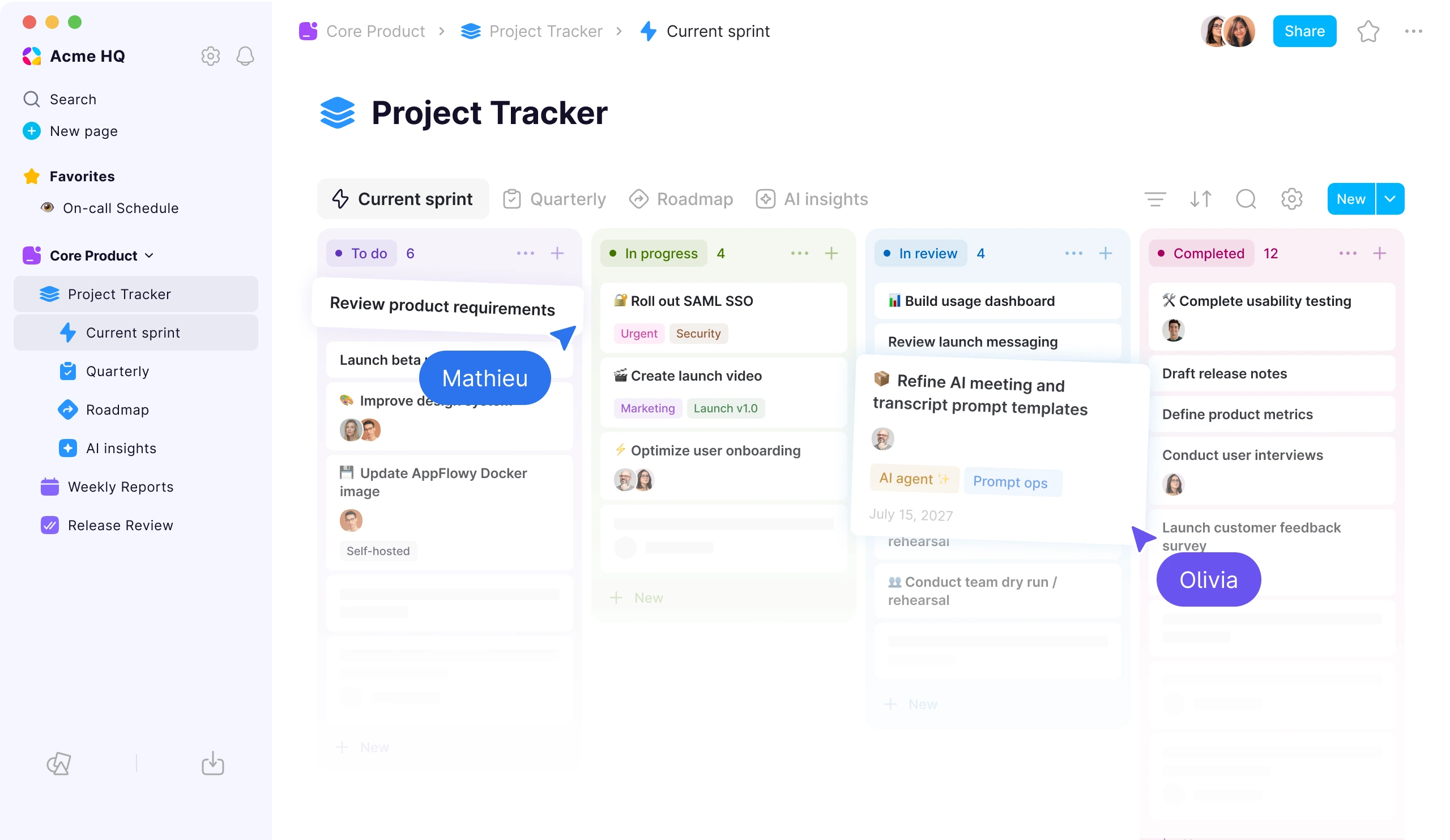
If you are searching for the best self-hosted Confluence alternative, start by deciding whether you need a traditional wiki or a broader workspace for documentation, databases, projects, and AI. The products in this category solve different problems even when they all describe themselves as knowledge-management platforms.
The short answer: AppFlowy is our top recommendation for organizations that want an all-in-one, self-hosted workspace rather than only a page-based wiki. It includes a built-in Confluence ZIP importer for HTML and CSV exports. XWiki is the strongest fit for a mature, highly extensible application wiki. Outline offers a polished documentation-first experience. BookStack is ideal for straightforward, carefully structured manuals. Docmost is a modern collaborative wiki with lighter database features.
AppFlowy publishes this guide, and AppFlowy is one of the products evaluated. We reviewed official product pages, documentation, repositories, deployment instructions, migration guides, and edition details on September 28, 2026. Features and packaging change, so confirm business-critical requirements with a production-style pilot.
For a direct two-product analysis, see AppFlowy vs Confluence or the visual AppFlowy vs Confluence comparison.
Best self-hosted Confluence alternatives at a glance
| Alternative | Best for | Structured work | Enterprise identity | AI options | Confluence migration path |
|---|---|---|---|---|---|
| AppFlowy | An all-in-one workspace for knowledge, projects, and operations | Relational databases, formulas, relations, rollups, forms, charts, and multiple views | SAML, OIDC, SCIM, and LDAP | Managed, local, and self-hosted models | Built-in Confluence ZIP importer for HTML and CSV exports; enterprise migration assistance |
| XWiki | Extensible enterprise wikis and custom knowledge applications | Structured data, forms, live tables, scripts, and extensions | LDAP and SSO options | Extension- and integration-dependent | Confluence XML importer; paid migration toolkit and services available |
| Outline | A polished, documentation-first team wiki | Collections and nested documents rather than relational databases | SAML SSO in the enterprise self-hosted edition | OpenAI or Azure AI Answers in eligible editions | Confluence HTML ZIP importer in Cloud, Business, and Enterprise editions |
| BookStack | Simple manuals, handbooks, and reference documentation | Fixed Shelf, Book, Chapter, and Page hierarchy | OIDC, SAML2, and LDAP | No native knowledge AI layer | Plan for a custom or manual migration workflow |
| Docmost | A modern real-time collaborative wiki | Bases with Table and Kanban views, depending on edition | SAML, OIDC, LDAP, and SCIM, depending on edition | Local or cloud models, depending on edition | Confluence HTML export importer |
Why teams are evaluating Confluence Data Center alternatives now
Atlassian has scheduled Data Center end of life for March 28, 2029 at 23:59 PST. Under the standard lifecycle, affected Data Center subscriptions and Marketplace apps become read-only after that point.
The purchasing timeline arrives sooner:
| Date | Data Center milestone |
|---|---|
| March 30, 2026 | New customers could no longer buy new Data Center subscriptions or associated Marketplace apps. |
| March 30, 2028 | The standard window closes for existing customers to buy new Data Center apps or expand subscriptions. |
| March 28, 2029 | Affected subscriptions and Marketplace apps reach end of life and become read-only. |
Atlassian describes limited extended-maintenance options for eligible customers, but the standard long-term path is Atlassian Cloud. Teams that must keep their knowledge platform on their own infrastructure therefore need to evaluate a different product, not merely a different Confluence plan.
The deadline should not force a rushed migration. It should create a firm schedule for inventory, proof-of-concept testing, remediation, and staged cutover.
What “self-hosted Confluence alternative” should mean
Self-hosting is more than finding a Docker Compose file. A credible replacement should let your organization control the application services and data plane while still meeting the collaboration and governance requirements that made Confluence useful.
We evaluated each alternative across seven areas:
- Deployment control: private cloud, on-premises, Kubernetes, air-gapped operation, storage, backups, and upgrade responsibility.
- Knowledge authoring: nested pages, rich text, concurrent editing, comments, mentions, search, templates, attachments, and version history.
- Structured workflows: databases, forms, properties, views, relations, reporting, and project tracking.
- Access and identity: spaces, groups, guests, granular permissions, SSO, directory provisioning, and auditability.
- Migration: supported Confluence export formats, hierarchy, attachments, links, comments, authorship, permissions, and macro handling.
- AI boundary: whether knowledge search and generation can remain inside organization-controlled infrastructure.
- Operational fit: observability, recovery, scaling, support, license terms, APIs, integrations, and a practical exit path.
Self-hosted and open source are also different questions. A product can allow customer-operated deployment while licensing some server or enterprise components commercially. Review the exact client, server, extension, and enterprise licenses you intend to run.
1. AppFlowy: best overall self-hosted Confluence alternative
Best for: Teams and enterprises that want one self-hosted platform for documents, wikis, relational databases, projects, forms, dashboards, and controllable AI.
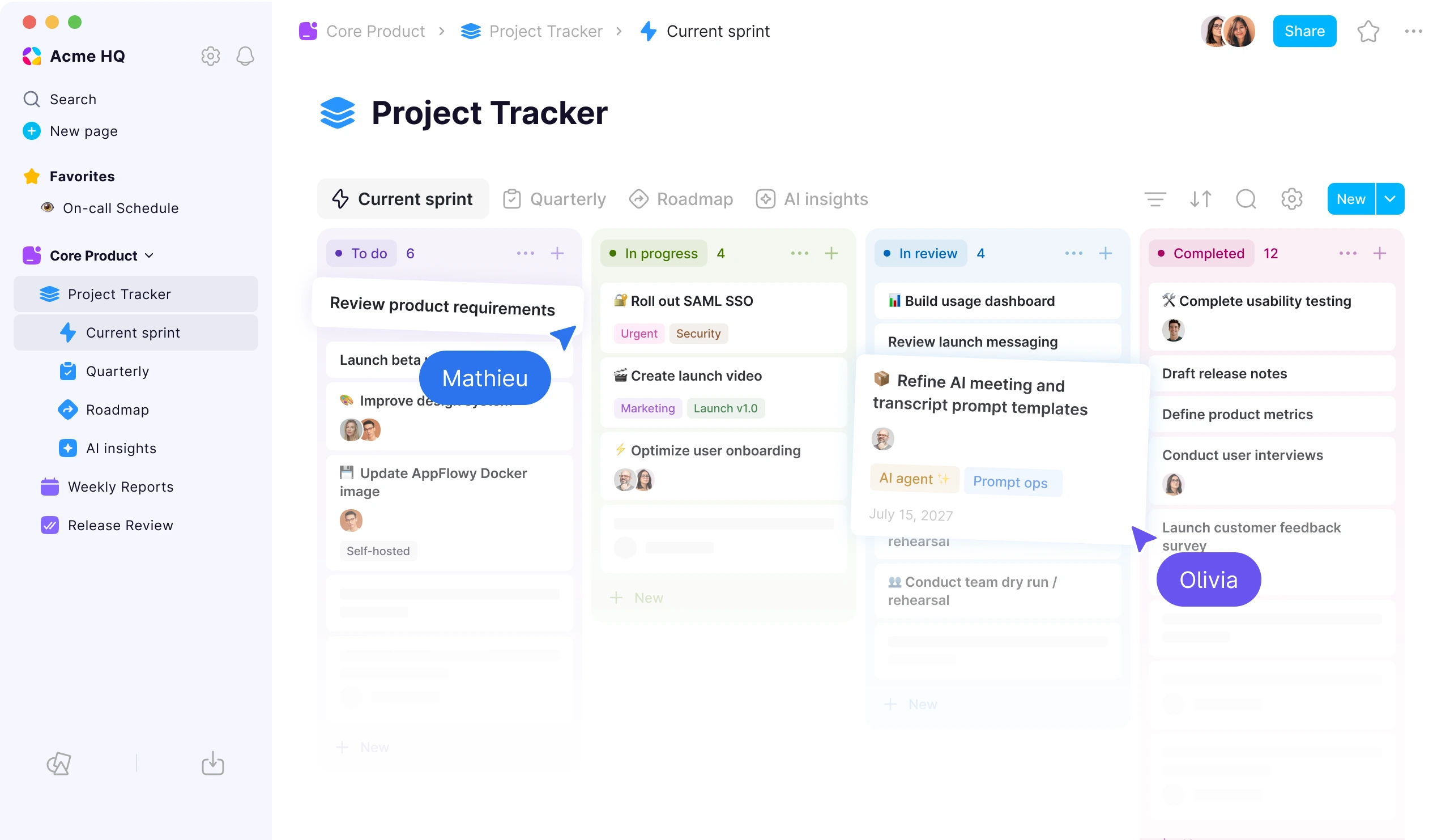
AppFlowy is the most complete fit in this comparison when replacing Confluence is also an opportunity to consolidate project trackers, internal tools, forms, and lightweight operational systems.
Its document hierarchy supports wikis, policies, specifications, meeting notes, and project hubs. Its relational database system adds Grid, Kanban, Calendar, Timeline, Gallery, List, Feed, Chart, and Form views. Database records are full pages, so a project, customer, incident, candidate, or policy can combine structured properties with detailed working context.
Relations, rollups, formulas, templates, linked views, and charts make AppFlowy particularly useful when knowledge needs to drive a workflow. One Projects database can appear as an engineering Kanban board, a leadership portfolio, and a quarterly Timeline without copying the underlying records.
Deployment, identity, and private AI
AppFlowy can run on organization-controlled infrastructure, in a private cloud, or in a fully air-gapped environment. Its production self-hosted distribution includes Docker Compose and Helm deployment assets. Enterprise identity options include SAML, OIDC, SCIM, and LDAP.
AppFlowy AI can use managed services, local models, or self-hosted LLM and embedding models. This matters when prompts, document chunks, embeddings, transcripts, and generated answers must stay inside a defined network boundary.
Confluence migration
AppFlowy has a built-in, direct Confluence ZIP importer. Teams can upload HTML or CSV ZIP exports from Confluence instead of converting pages manually. According to the current AppFlowy self-hosted release documentation, the importer handles page hierarchy and attachments, while supported formats can also preserve internal links, editable tables, source metadata, and comments as content. Complex workspaces should still test macros, apps, permissions, and edge cases with representative exports.
AppFlowy strengths
- combines documentation and advanced relational workflows in one product
- deploys on private infrastructure and in air-gapped environments
- supports local and self-hosted AI models
- offers native Windows, macOS, Linux, iOS, and Android clients plus the web app
- provides space-, group-, page-, member-, and guest-level collaboration controls
- includes a built-in Confluence ZIP importer for HTML and CSV exports, plus enterprise migration support
AppFlowy tradeoffs
- its integration and extension ecosystem is smaller than Atlassian Marketplace
- it does not currently include a native whiteboard
- operating a self-hosted deployment still requires backups, monitoring, upgrades, capacity planning, and security ownership
- the production self-hosted server is distributed under AppFlowy's commercial self-hosting license, while the AppFlowy client and web projects remain open source
Choose AppFlowy if Confluence pages are only one part of the problem and your teams also need to manage structured, changing work without sending sensitive data or AI processing to a vendor-controlled cloud.
2. XWiki: best for an extensible enterprise application wiki
Best for: Organizations that want a mature wiki foundation and are willing to configure or develop specialized knowledge applications.
XWiki is an established open-source Java platform that treats a wiki as an application-development environment. In addition to rich pages, comments, annotations, history, and permissions, it supports structured data, forms, scripts, and a large extension ecosystem.
That architecture is useful when an organization needs to model regulated procedures, product catalogs, technical reference systems, or other domain-specific applications around wiki content. Permissions can be set at wiki, page-and-children, and individual-page levels. LDAP and SSO integrations are available for enterprise environments.
XWiki provides a Confluence XML import process. The official documentation is candid that migration is multi-step and that custom or unsupported macros require additional work. XWiki SAS also offers a paid migration toolkit and professional services.
XWiki strengths
- mature wiki architecture with a long development history
- strong extensibility for structured knowledge applications
- fine-grained permissions and enterprise authentication options
- open-source core with community and commercial support paths
- documented Confluence importer and specialist migration tooling
XWiki tradeoffs
- administration and customization can demand more technical expertise
- its application-wiki model can feel heavier than a modern out-of-the-box workspace
- matching a macro-heavy Confluence instance may require paid extensions, consulting, or custom development
- project and database workflows are less immediately approachable than AppFlowy's built-in views and full-page records
Choose XWiki when configurability, wiki depth, and application-building matter more than a streamlined all-in-one workspace experience.
3. Outline: best polished documentation-first alternative
Best for: Teams that want a clean, focused company wiki and do not need relational project databases.
Outline centers the product on writing, organizing, finding, and sharing team documentation. Collections create top-level knowledge boundaries, nested documents provide hierarchy, and revision history supports review and recovery. Collection permissions can be assigned to people and groups.
For self-hosting, Docker is the recommended deployment method, with PostgreSQL, Redis, file storage, a domain, and a compatible authentication provider among the core requirements. SAML SSO is available in the enterprise self-hosted edition.
Outline offers AI Answers through OpenAI or Azure AI in eligible editions. It also provides a Confluence importer for HTML space exports in Cloud, Business, and Enterprise editions. The importer supports hierarchy, attachments, images, basic formatting, and simple tables, but not macros, plugins, comments, or authorship.
Outline strengths
- polished, focused writing and reading experience
- understandable collection- and document-based organization
- real-time collaboration, comments, revision history, search, and public sharing
- documented Docker deployment and Confluence import flow
- suitable for teams that want a wiki rather than an operating system for work
Outline tradeoffs
- no Notion- or AppFlowy-style relational database system
- important capabilities such as SAML, AI Answers, and the Confluence importer depend on edition
- self-hosting requires several external services and an authentication setup
- advanced operational workflows will usually live in separate tools
Choose Outline when documentation quality and simplicity are more important than databases, forms, dashboards, or local AI.
4. BookStack: best for simple, structured documentation
Best for: Teams that want a predictable hierarchy for manuals, handbooks, runbooks, and reference material.
BookStack deliberately uses a familiar Shelf, Book, Chapter, and Page structure. That constraint can be an advantage for organizations that want every piece of documentation to have an obvious home.
It includes WYSIWYG and Markdown editors, page templates, revisions, attachments, tags, diagrams.net integration, and export options. Authentication support includes OIDC, SAML2, and LDAP, while role and content permissions can be applied across the hierarchy.
BookStack is strongest when the replacement project is genuinely about documentation. It is not designed to reproduce AppFlowy-style relational databases, multiple project views, embedded operational forms, or a private AI knowledge layer.
BookStack strengths
- easy-to-understand information architecture
- focused feature set with relatively low conceptual overhead
- solid authentication, role, and content-permission options
- useful page templates, revisions, diagrams, and exports
- good fit for stable reference content and technical manuals
BookStack tradeoffs
- fixed hierarchy is less flexible for teams with many overlapping knowledge structures
- no native relational database or project-management layer
- no built-in AI knowledge experience
- no dedicated first-party Confluence migration workflow documented, so migration may require conversion, scripts, or manual cleanup
Choose BookStack when a simple, maintainable documentation system is preferable to a broader collaborative workspace.
5. Docmost: best modern collaborative wiki alternative
Best for: Teams that prioritize a modern real-time wiki with lightweight structured-data views.
Docmost is a self-hosted collaborative wiki with simultaneous page editing, comments, spaces, permissions, history, search, diagrams, and attachments. It can run in air-gapped environments.
Its Bases feature adds Table and Kanban views with properties, filters, sorts, and formulas. That gives teams more structure than a conventional page-only wiki, although organizations should compare edition availability and database depth with AppFlowy if structured workflows are central.
Docmost supports enterprise identity and AI options by edition, including SAML, OIDC, LDAP, SCIM, and local or cloud language models. Its Confluence import workflow accepts an HTML export and is designed to carry over page structure, content, images, and attachments.
Docmost strengths
- modern real-time collaborative editing
- spaces and permissions map naturally to team knowledge
- built-in Confluence HTML import workflow
- air-gapped operation and configurable AI options
- lightweight Table and Kanban Bases for structured information
Docmost tradeoffs
- some enterprise, AI, migration, and database capabilities depend on paid editions
- its ecosystem and operating history are smaller than XWiki's
- Bases are not as deep as AppFlowy's relational database and multi-view workflow system
- teams should validate backup, upgrade, support, and extension requirements during the pilot
Choose Docmost when the primary goal is a modern collaborative wiki with lightweight Table and Kanban-style structured data.
Which self-hosted Confluence alternative should you choose?
| Your priority | Best starting point | Why |
|---|---|---|
| Replace Confluence plus project trackers and internal databases | AppFlowy | Documents, relational databases, forms, charts, projects, and AI share one workspace. |
| Run AI entirely within your own environment | AppFlowy | Supports self-hosted LLM and embedding models in private and air-gapped deployments. |
| Build custom applications around structured wiki content | XWiki | Its extensible application-wiki model is designed for customization. |
| Provide a polished company handbook or documentation portal | Outline | Focused writing, organization, permissions, and search with less product complexity. |
| Maintain simple manuals and runbooks | BookStack | Its fixed hierarchy is easy to understand and govern. |
| Import Confluence ZIP exports and add advanced database workflows | AppFlowy | A built-in importer supports Confluence HTML and CSV ZIP exports, while relational databases support the work around the migrated knowledge. |
| Get a modern collaborative wiki with lightweight database views | Docmost | Real-time pages, spaces, and Table and Kanban Bases keep the product wiki-focused. |
AppFlowy leads this shortlist when the requirements span the greatest number of categories. It can serve as the knowledge layer, project system, structured database, form builder, reporting surface, and private AI workspace. If your scope is narrower, a more specialized wiki may be the better operational choice.
How to migrate from Confluence without losing critical knowledge
A successful migration is an information-architecture and governance project, not a one-click file transfer.
1. Inventory what you actually use
Export a list of spaces, pages, attachments, page templates, whiteboards, databases, macros, Marketplace apps, Jira links, automations, guests, groups, and restrictions. Identify owners and remove obsolete content before moving it.
2. Classify migration complexity
Separate ordinary pages from content that depends on macros, plugins, scripts, embedded systems, or custom metadata. Basic rich text is usually portable. App-specific behavior is not.
3. Map the destination model
Decide which Confluence spaces become spaces or collections, which pages become nested documents, and which trackers should become databases. In AppFlowy, a static project-status table may be better represented as a linked database with Kanban, Timeline, and Chart views.
4. Pilot with representative content
Include a small space, a large space, deeply nested pages, large attachments, tables, restricted pages, comments, unusual characters, and heavily used macros. Test both import success and everyday usability after import.
5. Validate permissions and identity separately
Content imports rarely recreate an organization's entire identity and authorization model. Map users and groups, then test inherited access, restricted pages, guests, offboarding, SSO, directory sync, and audit events.
6. Rebuild integrations intentionally
List every Jira macro, app, webhook, automation, embedded diagram, and external report. Decide whether to replace, redesign, integrate, archive, or retire each dependency instead of assuming an importer can reproduce it.
7. Run a controlled cutover
Freeze or limit edits in the source, complete a final export, import the delta, validate counts and links, communicate the cutover, and retain a read-only source for an agreed period. Document rollback criteria before migration day.
What does a self-hosted Confluence replacement really cost?
License price is only one line in the total cost of ownership. Budget for:
- compute, databases, object storage, search, and AI infrastructure
- monitoring, logs, alerting, incident response, and capacity planning
- encrypted backups and regularly tested recovery procedures
- upgrades, database migrations, security patches, and staging environments
- SSO, directory provisioning, audit requirements, and compliance work
- migration tooling, cleanup, training, support, and change management
- custom integrations and the ongoing maintenance they create
A simpler wiki may cost less to operate than a broad workspace. A broader workspace may reduce the number of separate tools, integrations, and data silos the organization maintains. Compare complete operating models rather than subscription prices alone.
Sources and methodology
This guide was reviewed against official sources on September 28, 2026:
- Atlassian Data Center end-of-life policy
- AppFlowy product and self-hosting overview and production self-hosted distribution
- XWiki feature overview and Confluence import documentation
- Outline self-hosting documentation and Confluence importer
- BookStack documentation and roles and permissions guide
- Docmost documentation, edition comparison, and import guide
AppFlowy publishes this article and is the featured recommendation. We have tried to distinguish core features from edition-specific capabilities and to state AppFlowy's self-hosted licensing precisely. Buyers should verify current plan limits, security controls, deployment requirements, and migration fidelity directly with each vendor.
Frequently asked questions
What is the best self-hosted alternative to Confluence?
AppFlowy is our top overall recommendation for teams that need self-hosted documentation, relational databases, projects, forms, dashboards, enterprise access controls, and local or on-premises AI in one workspace.
XWiki is better suited to highly customized application-wiki use cases. Outline is a strong documentation-first option, BookStack is ideal for simple structured manuals, and Docmost offers a modern collaborative wiki with lightweight database views.
Can Confluence be self-hosted after 2029?
Under Atlassian's standard lifecycle, affected Confluence Data Center subscriptions and Marketplace apps become read-only when Data Center reaches end of life on March 28, 2029. Atlassian describes limited extended-maintenance arrangements for eligible customers, but Atlassian Cloud is the standard long-term Confluence path.
Is Atlassian Cloud a self-hosted Confluence alternative?
No. Atlassian operates Confluence Cloud. It may be the right destination for organizations that want to retain Jira integration, Marketplace apps, and Atlassian's cloud services, but it does not satisfy a requirement to run the workspace on customer-controlled infrastructure.
Is AppFlowy open source and self-hosted?
AppFlowy's client and web projects are open source. Its current production self-hosted server is distributed under the AppFlowy Self-Hosted Commercial License. The precise description is an open-source client ecosystem paired with a commercially licensed, customer-operated production backend.
Which alternative is best for Confluence databases and project tracking?
AppFlowy offers the deepest built-in structured workflow system in this comparison. Its relational databases support multiple views, full-page records, relations, rollups, formulas, templates, forms, charts, and linked instances of the same data.
Which self-hosted Confluence alternative is easiest to use?
The answer depends on scope. BookStack is straightforward when a fixed documentation hierarchy is enough. Outline is polished for a conventional team wiki. AppFlowy reduces tool switching when teams also need databases and project workflows, although that broader capability introduces more concepts.
Can these tools import Confluence spaces automatically?
Yes. AppFlowy has a built-in Confluence ZIP importer that supports HTML and CSV ZIP exports. XWiki, Outline, and Docmost also document Confluence import workflows, but their supported formats, editions, and fidelity differ. No importer can reproduce every macro, Marketplace app, automation, permission rule, or custom integration. BookStack generally requires a more custom or manual migration workflow.
Which alternative supports air-gapped deployment and private AI?
AppFlowy supports fully air-gapped deployment together with self-hosted LLM and embedding models. Docmost also documents air-gapped operation and local-model options by edition. Validate all external dependencies, update channels, model artifacts, authentication, and license checks in an environment that mirrors production.
Final verdict
The best replacement depends on whether your Confluence instance is primarily a library of pages or the front end of a broader operating system.
Choose XWiki for deep wiki extensibility, Outline for polished documentation, BookStack for simple manuals, or Docmost for a modern collaborative wiki. Choose AppFlowy when your organization needs a self-hosted knowledge platform that also connects projects, databases, forms, reporting, and private AI.
Explore AppFlowy, review the complete AppFlowy vs Confluence comparison, or to discuss deployment and migration requirements.